 Firefox
 1 / 8
1 / 8Loading font…
About Sticker Doodle Font
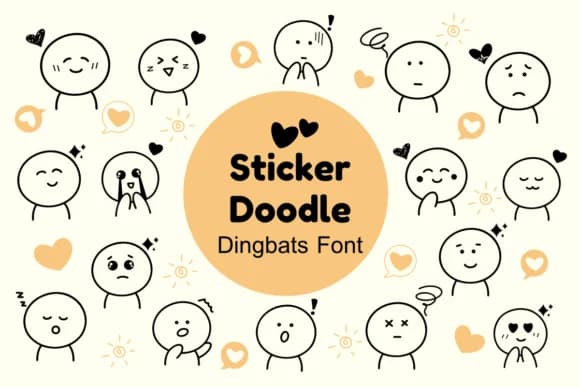
Sticker Doodle by Nun Sukhwan is a playful dingbats font with a handwritten, slightly vintage character that feels both whimsical and intentional. The collection of decorative marks and icons gives you a hand-drawn aesthetic without requiring illustration skills, making it ideal for adding charm and personality to everything from Valentine card suites to custom sticker designs for small makers and independent sellers looking to stand out.
This font shines when you need visual interest and character without complexity. Create handmade-looking classroom posters, teacher resources, and educational materials that actually capture kids' attention rather than blending into the noise. The monochrome dingbats work beautifully as logo embellishments, craft overlays, and background textures that add genuine visual depth to simpler designs. Each glyph feels intentional and thoughtfully drawn, the kind of detail that makes handmade work truly stand out and feel authentic.
Layering and mixing these marks into your layouts gives you flexibility across any medium: print, digital, or physical products. Use individual marks as standalone accents or weave them throughout your project for a cohesive, playful look that feels custom-crafted. Grab Sticker Doodle from Creative Fabrica and start bringing handcrafted warmth and personality to your design work.
Style & Use Cases
- Overall Style
- Iconographic, Dingbats Font
- Use Case
- Icons, Accents
- Ideal For
- ornaments, bullets, and decorative flourishes
- Pairs With
- any text font
How to Install Sticker Doodle Font
Step-by-step instructions for every platform
- 1Download the Sticker Doodle font file (.ttf or .otf).
- 2Locate the downloaded file in your Downloads folder.
- 3Right-click the font file.
- 4Select "Install" to install for the current user, or "Install for all users" to make it available system-wide.
- 5Sticker Doodle is now available in Word, Photoshop, Illustrator, and all other apps.
More by Nun Sukhwan
View all →



Browse fonts by theme
Curated collections →Saw a font in a picture? Identify any font from an image with our free Font Finder.
More Dingbats Fonts
Browse all →







What pairs well with Sticker Doodle Font?
Sticker Doodle Font is a versatile dingbats font that works for both headings and body text. Pair it with a contrasting sans-serif or serif font to add visual interest and a clear distinction between titles and body copy.



Sticker Doodle Font
by Nun Sukhwan
Reviewed by the FontBoxDL team · Updated October 2026