
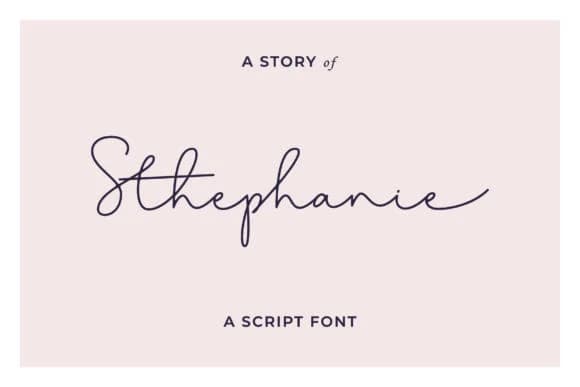
 1 / 8
1 / 8About Stephanie Font
Stephanie Font by andikafez is a flowing handwritten script that brings warmth and genuine personality to designs that need authentic character. The loose, natural letterforms create a conversational feel without being overly casual, giving you flexibility across projects with different tones and aesthetics.
This typeface shines wherever you want personality to show through without feeling forced. Wedding invitation suites gain an intimate, personal touch when you set names and dates in Stephanie, while the script's inherent friendliness suits branding for boutique skincare companies positioning themselves as approachable and human-centered. Product labels for artisanal goods benefit from the authenticity the letterforms convey, helping small producers stand apart from mass-market competition. Greeting card designs look genuinely handcrafted rather than templated, and Etsy sellers often pair handwritten scripts like this with product photography to add perceived warmth and value to packaging mockups.
The font handles both digital and print applications with equal ease, giving you real flexibility. Stephanie works beautifully as a secondary headline script or as the anchor for a logo refresh, bringing enough visual distinction to stand out without overwhelming the rest of your composition. Head to Creative Fabrica to add it to your library.
Style & Use Cases
- Overall Style
- Elegant, Flowing, Stephanie Story
- Use Case
- Invitations, Branding
- Ideal For
- wedding stationery, greeting cards, and signatures
- Pairs With
- a simple uppercase sans
How to Install Stephanie Font Font
Step-by-step instructions for every platform
- 1Download the Stephanie Font font file (.ttf or .otf).
- 2Locate the downloaded file in your Downloads folder.
- 3Right-click the font file.
- 4Select "Install" to install for the current user, or "Install for all users" to make it available system-wide.
- 5Stephanie Font is now available in Word, Photoshop, Illustrator, and all other apps.
More Script Handwritten Fonts
Browse all →







What pairs well with Stephanie Font?
Stephanie Font is a script font that shines as a display or heading face. Pair it with a clean sans-serif or serif font for body text — the contrast creates a clear hierarchy while the two styles stay balanced and easy to read.



Stephanie Font
by andikafez
Reviewed by the FontBoxDL team · Updated September 2026