 Firefox
 1 / 8
1 / 8About Spooky School Dingbats Font
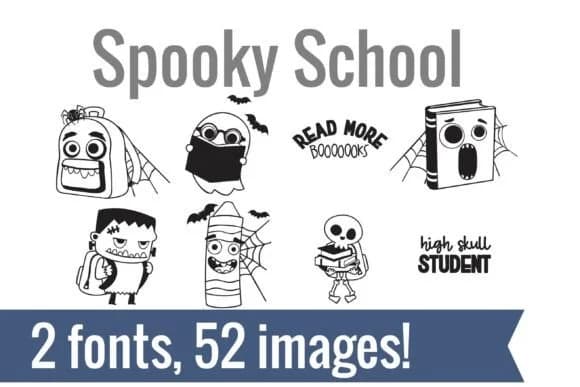
Spooky School Dingbats by Illustration Ink is a two-font dingbat collection that blends Halloween spookiness with classroom charm. The set pairs school staples with a haunted twist, turning everyday pencils into skeletons, apples into vampires, and glue bottles into zombies. Each character has personality, from mummified notebooks to pun-filled labels like "Glued Work!" With over 50 hand-drawn, fully vectorized illustrations, this collection brings instant visual storytelling to educational projects without requiring multiple sources or custom work.
This works especially well for Halloween classroom bulletin boards, spooky teacher reward stickers, October-themed worksheet illustrations, and trick-or-treat door hangers. Teachers and creatives alike appreciate having a unified visual language that feels intentional and cohesive across all their materials. The two-font setup gives you flexibility to mix and match, layering them for depth or alternating them to pace visual rhythm across larger designs. Just type any letter and pull the corresponding doodle, ready instantly for digital worksheets, vinyl decals, and sticker sheet projects.
The illustrations are fully vectorized, so they work beautifully across cutting software, standard design applications, and print workflows alike. Get the set on Creative Fabrica to start bringing some friendly spook into your classroom projects and seasonal designs throughout the year.
Style & Use Cases
- Overall Style
- Iconographic, Halloween
- Use Case
- Icons, Accents
- Ideal For
- ornaments, bullets, and decorative flourishes
- Pairs With
- any text font
How to Install Spooky School Dingbats Font
Step-by-step instructions for every platform
- 1Download the Spooky School Dingbats font file (.ttf or .otf).
- 2Locate the downloaded file in your Downloads folder.
- 3Right-click the font file.
- 4Select "Install" to install for the current user, or "Install for all users" to make it available system-wide.
- 5Spooky School Dingbats is now available in Word, Photoshop, Illustrator, and all other apps.
More by Illustration Ink
View all →



Browse fonts by theme
Curated collections →Saw a font in a picture? Identify any font from an image with our free Font Finder.
More Dingbats Fonts
Browse all →







What pairs well with Spooky School Dingbats Font?
Spooky School Dingbats Font is a versatile dingbats font that works for both headings and body text. Pair it with a contrasting sans-serif or serif font to add visual interest and a clear distinction between titles and body copy.



Spooky School Dingbats Font
Reviewed by the FontBoxDL team · Updated June 2026