 Firefox
 1 / 5
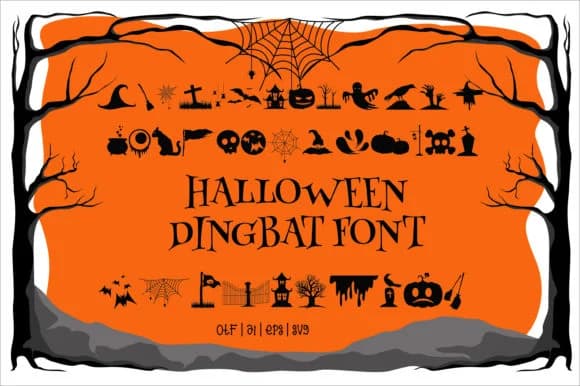
1 / 5About Spooky Night Font
You're laying out Halloween party invitations and need spooky icons to frame your text without hunting through separate image libraries. Spooky Night, a dingbats font by edywiyonopp, delivers exactly that: a collection of dramatic horror-themed symbols and graphic elements designed to inject genuine atmosphere into your work. The collection shines for Halloween party invitations, trick-or-treat bag labels, haunted house promotional flyers, and costume design tags. Each glyph carries that moody, spine-chilling quality that makes October designs feel authentic rather than costume-y or half-hearted.
As a dingbats font, Spooky Night puts you in control of where these graphics land in your layout without relying on secondary image files or extra design steps. Drop them as borders, scatter them as scene-setters, or use them to break up text-heavy sections throughout your layout. The symbols scale cleanly at any size, making them effective on large event posters and equally useful on small product labels or tags. You get the precision of font-based graphics with the visual punch of custom icons. If you're working in Adobe Creative Suite, Affinity, or any tool that reads standard font files, these behave like regular typography. Grab Spooky Night on Creative Fabrica and start building designs that actually deliver the mood you're chasing.
Style & Use Cases
- Overall Style
- Iconographic, Fonts
- Use Case
- Icons, Accents
- Ideal For
- ornaments, bullets, and decorative flourishes
- Pairs With
- any text font
How to Install Spooky Night Font
Step-by-step instructions for every platform
- 1Download the Spooky Night font file (.ttf or .otf).
- 2Locate the downloaded file in your Downloads folder.
- 3Right-click the font file.
- 4Select "Install" to install for the current user, or "Install for all users" to make it available system-wide.
- 5Spooky Night is now available in Word, Photoshop, Illustrator, and all other apps.
More by edywiyonopp
View all →
Browse fonts by theme
Curated collections →Saw a font in a picture? Identify any font from an image with our free Font Finder.
More Dingbats Fonts
Browse all →







What pairs well with Spooky Night Font?
Spooky Night Font is a versatile dingbats font that works for both headings and body text. Pair it with a contrasting sans-serif or serif font to add visual interest and a clear distinction between titles and body copy.



Spooky Night Font
by edywiyonopp
Reviewed by the FontBoxDL team · Updated July 2026