 Firefox
 1 / 5
1 / 5About BM Graphics - Speech Bubbles Font
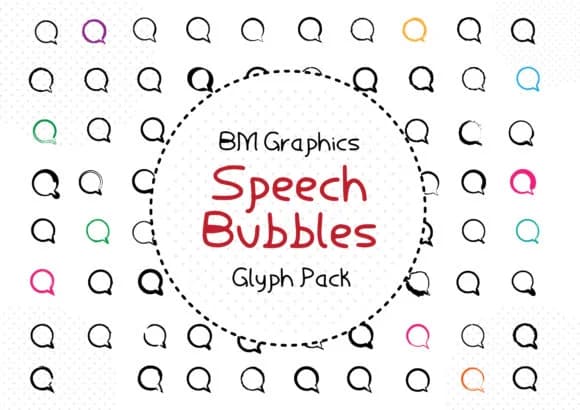
This font radiates playful energy and conversation. BM Graphics' Speech Bubbles delivers 81 distinct dingbat characters that capture the dynamic feel of thought and speech in pure visual form.
Use these glyphs for social media story templates where you need instant personality, comic book panel overlays, kids' book illustrations with interactive dialogue, or podcast thumbnail graphics where that conversational punch matters most. You'll get plenty of freedom to mix bubble shapes and sizes across layouts without repeating yourself, and you can scale them from tiny accent elements to full-width focal points depending on your layout needs. Each glyph works as a standalone graphical element or pairs with other typefaces, keeping this set genuinely flexible for any project that leans into humor, narrative, or playful communication. Layer these into your designs and you'll reach for them far more often than you'd initially expect, especially when you need to add visual interest fast.
Pair Speech Bubbles with a clean, readable sans-serif like Inter or Montserrat for body text, letting the font's playful personality shine as your visual anchor. Get it on Creative Fabrica and bring conversational energy to your next piece.
Style & Use Cases
- Overall Style
- Iconographic, Pack
- Use Case
- Icons, Accents
- Ideal For
- ornaments, bullets, and decorative flourishes
- Pairs With
- any text font
How to Install BM Graphics - Speech Bubbles Font
Step-by-step instructions for every platform
- 1Download the BM Graphics - Speech Bubbles font file (.ttf or .otf).
- 2Locate the downloaded file in your Downloads folder.
- 3Right-click the font file.
- 4Select "Install" to install for the current user, or "Install for all users" to make it available system-wide.
- 5BM Graphics - Speech Bubbles is now available in Word, Photoshop, Illustrator, and all other apps.
More by GraphicsBam Fonts
View all →
Browse fonts by theme
Curated collections →Saw a font in a picture? Identify any font from an image with our free Font Finder.
More Dingbats Fonts
Browse all →







What pairs well with BM Graphics - Speech Bubbles Font?
BM Graphics - Speech Bubbles Font is a versatile dingbats font that works for both headings and body text. Pair it with a contrasting sans-serif or serif font to add visual interest and a clear distinction between titles and body copy.



BM Graphics - Speech Bubbles Font
Reviewed by the FontBoxDL team · Updated July 2026