 Firefox
 1 / 8
1 / 8About Sparkling Star Font
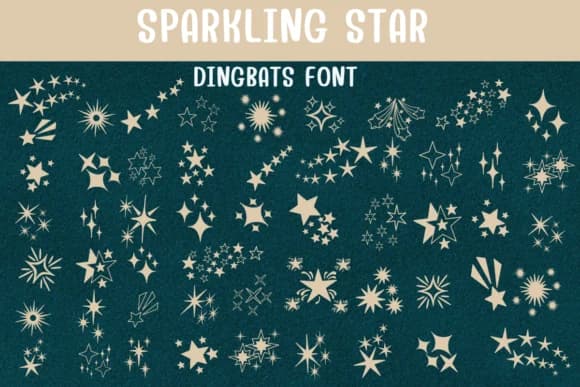
You're designing a children's storybook cover and need something that captures wonder and whimsy from the very first glance. Sparkling Star by Sontaya is a dingbats collection built for exactly that kind of magic. The font draws from a full range of star-shaped characters, including classic five-pointers, radiating burst patterns, and twinkling variations that give layouts real dimension and visual richness. Each character feels hand-drawn, with enough personality to stand on its own.
This works beautifully for nursery wall decals, where parents layer the characters to build glittering scenes across soft pastel walls. Birthday party materials, especially celestial or space-themed invitations, come alive when you mix the different star weights and sizes throughout the design. Small decorative projects like gift labels, scrapbook embellishments, or kids' activity worksheets all benefit from the range of glyph options. The varied character set keeps designs from feeling repetitive, and each position gets its own unique visual flavor.
What makes Sparkling Star stand out is how well the larger point sizes perform. They read with impact and clarity, perfect for when you need stars to be the main focus rather than background texture. You'll find it ready to go on Creative Fabrica, completely licensed and ready to add cosmic charm to whatever comes next.
Style & Use Cases
- Overall Style
- Iconographic, Star
- Use Case
- Icons, Accents
- Ideal For
- ornaments, bullets, and decorative flourishes
- Pairs With
- any text font
How to Install Sparkling Star Font
Step-by-step instructions for every platform
- 1Download the Sparkling Star font file (.ttf or .otf).
- 2Locate the downloaded file in your Downloads folder.
- 3Right-click the font file.
- 4Select "Install" to install for the current user, or "Install for all users" to make it available system-wide.
- 5Sparkling Star is now available in Word, Photoshop, Illustrator, and all other apps.
Browse fonts by theme
Curated collections →Saw a font in a picture? Identify any font from an image with our free Font Finder.
More Dingbats Fonts
Browse all →







What pairs well with Sparkling Star Font?
Sparkling Star Font is a versatile dingbats font that works for both headings and body text. Pair it with a contrasting sans-serif or serif font to add visual interest and a clear distinction between titles and body copy.



Sparkling Star Font
by Sontaya
Reviewed by the FontBoxDL team · Updated June 2026