 Firefox
 1 / 5
1 / 5About Smart Labels Font
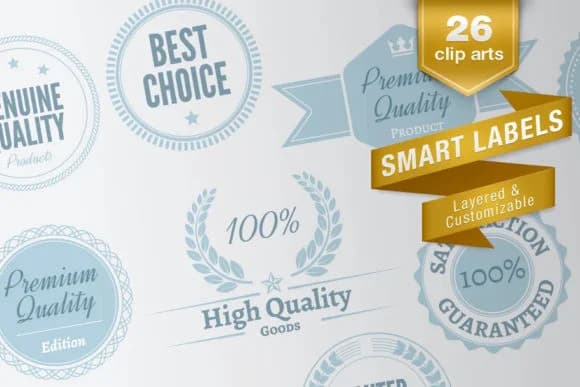
You're designing a batch of tags for a flash sale, and you need flexible label options that don't require wrestling with a vector editor for hours. That's where Smart Labels, a dingbat font from designer Juraj Chrastina, steps in. This typeface family comes in three distinct fonts, offering a collection of 26 layered vector clip arts built directly into 52 glyphs per font.
The setup is intuitive and requires no specialized design skills. One font contains pre-made labels with text already positioned (accessed as uppercase letters), while a companion set has empty label frames you fill in with your own words. For multi-color work, both the frame and text versions split into two separate layers, so layering colors becomes straightforward and efficient. You don't need design software expertise to work with these, though converting them to vector outlines opens up unlimited editing if you want that control later.
Use Smart Labels for sale tags, product pricing stickers, gift wrap labels, or discount badges. The three-font system means you get 26 distinct label shapes across different visual styles, ready for boutique retail, e-commerce product packaging, or DIY craft projects. Grab it on Creative Fabrica and start labeling.
Style & Use Cases
- Overall Style
- Iconographic, Smart Labels
- Use Case
- Icons, Accents
- Ideal For
- ornaments, bullets, and decorative flourishes
- Pairs With
- any text font
How to Install Smart Labels Font
Step-by-step instructions for every platform
- 1Download the Smart Labels font file (.ttf or .otf).
- 2Locate the downloaded file in your Downloads folder.
- 3Right-click the font file.
- 4Select "Install" to install for the current user, or "Install for all users" to make it available system-wide.
- 5Smart Labels is now available in Word, Photoshop, Illustrator, and all other apps.
More by Juraj Chrastina
View all →

Browse fonts by theme
Curated collections →Saw a font in a picture? Identify any font from an image with our free Font Finder.
More Dingbats Fonts
Browse all →







What pairs well with Smart Labels Font?
Smart Labels Font is a versatile dingbats font that works for both headings and body text. Pair it with a contrasting sans-serif or serif font to add visual interest and a clear distinction between titles and body copy.



Smart Labels Font
Reviewed by the FontBoxDL team · Updated July 2026