
 1 / 8
1 / 8About Skull Halloween Font
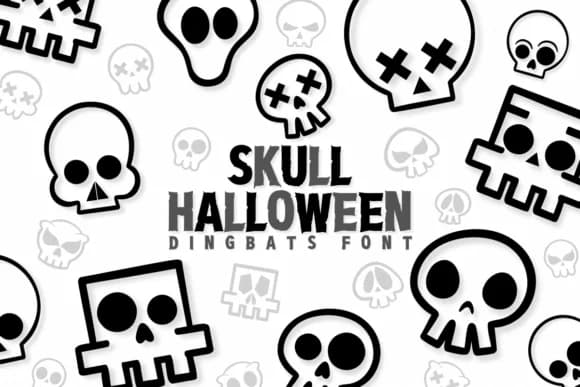
Skull Halloween by Chonada is a dingbat font where every character transforms into an illustrated skull. Rather than letters, you get a complete set of spooky cartoon icons with varied expressions and proportions, from grim grins to vacant stares. The high-contrast black and white outlines keep them bold and readable whether you're scaling up for a poster or sizing down for a label.
This works brilliantly for seasonal projects that need visual punch without requiring separate graphics. Halloween greeting card designs benefit from consistent, quality iconography that's ready to print or place digitally. Event invitation graphics for October parties can swap out standard fonts and lean on these character-filled alternatives instead. Apparel transfers, gift tags, and party favor stickers pop with this font because every glyph feels intentional and finished, not like placeholder graphics.
The styling sits somewhere between genuinely creepy and approachable, so it suits both children's craft projects and adult costume party materials. Since it's a complete character set, you can build scenes or compositions just by typing, letting the font do the heavy lifting for visual consistency across multiple pieces. Pick up Skull Halloween on Creative Fabrica to add a dose of quirky spookiness to your next seasonal project.
Style & Use Cases
- Overall Style
- Iconographic, Skull
- Use Case
- Icons, Accents
- Ideal For
- ornaments, bullets, and decorative flourishes
- Pairs With
- any text font
How to Install Skull Halloween Font
Step-by-step instructions for every platform
- 1Download the Skull Halloween font file (.ttf or .otf).
- 2Locate the downloaded file in your Downloads folder.
- 3Right-click the font file.
- 4Select "Install" to install for the current user, or "Install for all users" to make it available system-wide.
- 5Skull Halloween is now available in Word, Photoshop, Illustrator, and all other apps.




Browse fonts by theme
Curated collections →Saw a font in a picture? Identify any font from an image with our free Font Finder.
More Dingbats Fonts
Browse all →







What pairs well with Skull Halloween Font?
Skull Halloween Font is a versatile dingbats font that works for both headings and body text. Pair it with a contrasting sans-serif or serif font to add visual interest and a clear distinction between titles and body copy.



Skull Halloween Font
by Chonada
Reviewed by the FontBoxDL team · Updated June 2026