 Firefox
 1 / 7
1 / 7About Skriva Font
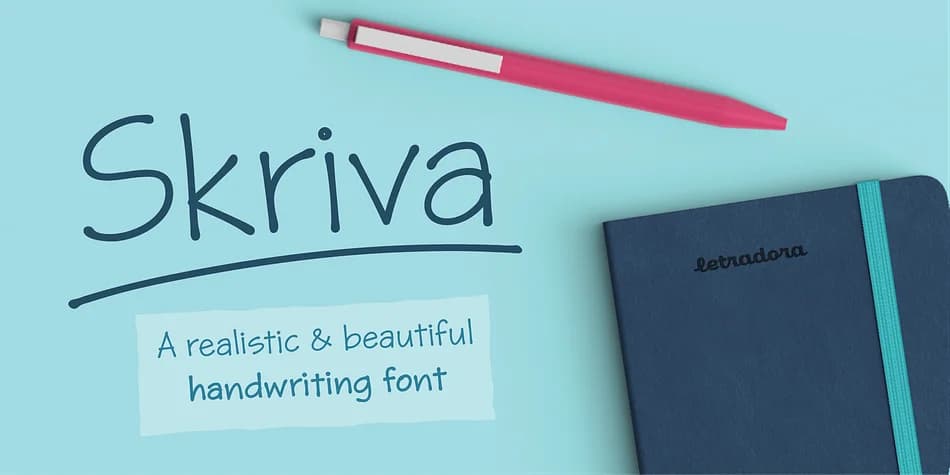
This is the handwriting style that looks effortlessly polished, like someone actually spent time perfecting their penmanship. Skriva, designed by Letradora, captures that careful, readable quality while keeping genuine character intact. The typeface comes loaded with four weights (light, regular, bold, and inky), giving you real flexibility across different layouts.
Where this font really shines is in designs that call for a human touch. Wedding invitation suites benefit from its refined cursiveness, while personalized gift card designs and artisan product labels (think small-batch coffee roasters or indie cosmetics) feel authentic without looking handmade-clumsy. It also works beautifully for custom children's book illustrations and DIY event signage. The OpenType features include random alternates that cycle through subtle variations, preventing that robotic repetition you get with most script fonts. Skriva supports over 200 Latin languages, so you can work across markets without swapping typefaces.
Pair it with a clean, modern sans-serif like a neutral grotesque for any body copy, which gives your designs breathing room and keeps everything readable. Find it on Creative Fabrica to add authentic handwritten character to any design.
Style & Use Cases
- Overall Style
- Bold, Distinctive
- Use Case
- Headlines, Posters
- Ideal For
- logos, packaging, and standout titles
- Pairs With
- a neutral sans-serif
How to Install Skriva Font
Step-by-step instructions for every platform
- 1Download the Skriva font file (.ttf or .otf).
- 2Locate the downloaded file in your Downloads folder.
- 3Right-click the font file.
- 4Select "Install" to install for the current user, or "Install for all users" to make it available system-wide.
- 5Skriva is now available in Word, Photoshop, Illustrator, and all other apps.
More by Letradora
View all →
Browse fonts by theme
Curated collections →Saw a font in a picture? Identify any font from an image with our free Font Finder.
More Decorative Fonts
Browse all →







What pairs well with Skriva Font?
Skriva Font is a decorative font that shines as a display or heading face. Pair it with a clean sans-serif or serif font for body text — the contrast creates a clear hierarchy while the two styles stay balanced and easy to read.



Skriva Font
by Letradora
Reviewed by the FontBoxDL team · Updated July 2026