
 1 / 8
1 / 8About Single Flower Font
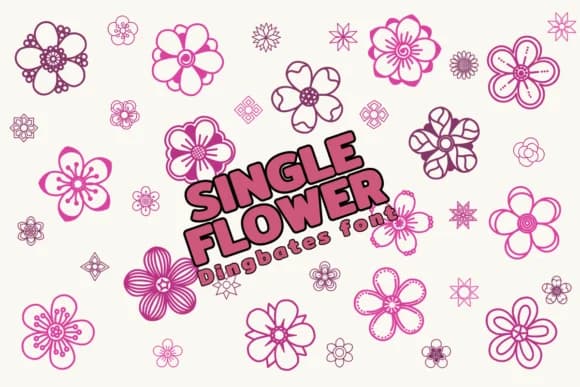
This font brings whimsy and natural charm. Single Flower by Chonada is a dingbat collection where each character transforms into a different botanical illustration, allowing designers to scatter blooms throughout layouts instead of relying on traditional letterforms. The sketched quality gives everything an artisanal, deliberately imperfect feeling.
The dingbat approach opens up creative possibilities that traditional typography can't match. Greeting card designers can use individual flower characters as graphic accents layered over type, creating depth without clutter. Wedding invitations benefit from the natural aesthetic, particularly when florals break up negative space in elegant compositions. Scrapbooking projects gain visual interest through hand-drawn elements scattered between photos and journaling text. Children's book designers will find the playful illustrations work beautifully as chapter dividers or on title pages. Nature journal covers and botanical-themed social media graphics also respond well to this organic character set.
Single Flower functions best as a companion element rather than a complete text replacement. Pair it with a warm, rounded sans-serif for body copy so the floral characters remain distinct visual anchors. Grab it from Creative Fabrica and start designing with these charming botanical illustrations.
Style & Use Cases
- Overall Style
- Iconographic, Doodle
- Use Case
- Icons, Accents
- Ideal For
- ornaments, bullets, and decorative flourishes
- Pairs With
- any text font
How to Install Single Flower Font
Step-by-step instructions for every platform
- 1Download the Single Flower font file (.ttf or .otf).
- 2Locate the downloaded file in your Downloads folder.
- 3Right-click the font file.
- 4Select "Install" to install for the current user, or "Install for all users" to make it available system-wide.
- 5Single Flower is now available in Word, Photoshop, Illustrator, and all other apps.




Browse fonts by theme
Curated collections →Saw a font in a picture? Identify any font from an image with our free Font Finder.
More Dingbats Fonts
Browse all →







What pairs well with Single Flower Font?
Single Flower Font is a versatile dingbats font that works for both headings and body text. Pair it with a contrasting sans-serif or serif font to add visual interest and a clear distinction between titles and body copy.



Single Flower Font
by Chonada
Reviewed by the FontBoxDL team · Updated July 2026