 Firefox
 1 / 7
1 / 7Loading font…
About Scary Face Font
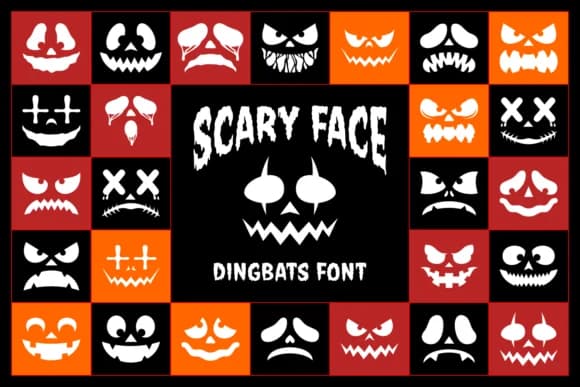
Scary Face is a dingbat font from designer Situjuh where every character is a face, not a letter. Instead of the alphabet, you get pumpkins, jack-o'-lanterns, and wicked visages ranging from menacing snarls to goofy cross-eyed grins. The full character set includes uppercase and lowercase substitutes (mapped A through Z) plus numerals 0 through 9, all rendered as different creepy expressions, with several designs available in both black and red versions to give you layout flexibility.
This is the tool for anyone building Halloween content that needs visual punch without commissioning custom illustration work. Graphic designers reach for it when building horror movie posters or seasonal merchandise graphics. You'll speed up work on haunted attraction signage, spooky greeting cards, trick-or-treat party invitations, and e-commerce product images for horror-themed shops. Crafters layer it into wooden signs, printable decorations, and DIY Halloween costumes to add detailed scary faces without hours of drawing. The dingbat format means you skip the hunt for scary illustrations and just type.
Get Scary Face on Creative Fabrica to round out your seasonal design toolkit with finished horror expressions, from subtle accents to full-blown spooky systems.
Style & Use Cases
- Overall Style
- Iconographic, Scary Face Dingbats Font
- Use Case
- Icons, Accents
- Ideal For
- ornaments, bullets, and decorative flourishes
- Pairs With
- any text font
How to Install Scary Face Font
Step-by-step instructions for every platform
- 1Download the Scary Face font file (.ttf or .otf).
- 2Locate the downloaded file in your Downloads folder.
- 3Right-click the font file.
- 4Select "Install" to install for the current user, or "Install for all users" to make it available system-wide.
- 5Scary Face is now available in Word, Photoshop, Illustrator, and all other apps.

Browse fonts by theme
Curated collections →Saw a font in a picture? Identify any font from an image with our free Font Finder.
More Dingbats Fonts
Browse all →







What pairs well with Scary Face Font?
Scary Face Font is a versatile dingbats font that works for both headings and body text. Pair it with a contrasting sans-serif or serif font to add visual interest and a clear distinction between titles and body copy.



Scary Face Font
by Situjuh
Reviewed by the FontBoxDL team · Updated October 2026