 Firefox
 1 / 8
1 / 8Loading font…
About Santa Claus Doodle Font
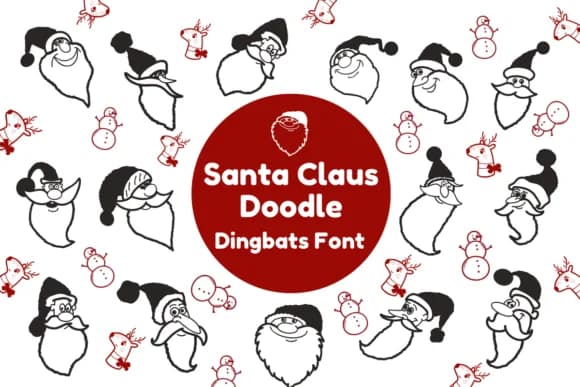
This dingbat font brings instant holiday cheer to your designs with character and warmth. Santa Claus Doodle by Nun Sukhwan is a whimsical collection of hand-drawn symbols that work beautifully as decorative accents and standalone characters. The playful personality makes it ideal for holiday sticker sheets, Christmas greeting card layouts, festive gift tag design, and ornamental seasonal packaging. Beyond winter themes, crafters have found real success using it for kids' birthday party invitations, teacher classroom bulletin boards, quirky holiday t-shirt designs, and even hand-lettered holiday greeting labels for small businesses.
The monochrome styling keeps each character clean and crisp, making it surprisingly versatile across different media without losing legibility or charm. You can layer these symbols to build repeating patterns, scatter them across backgrounds for visual interest, or use individual glyphs as charming focal points. The handwritten quality feels authentic and genuine without reading as amateur or overly cutesy, which is precisely why it works equally well on DIY craft labels and more polished holiday packaging.
Pair Santa Claus Doodle with a clean sans-serif for sophisticated holiday materials, or let it lead your designs solo for maximum festive impact. Get it from Creative Fabrica and start bringing character to your seasonal projects.
Style & Use Cases
- Overall Style
- Iconographic, Dingbats Font
- Use Case
- Icons, Accents
- Ideal For
- ornaments, bullets, and decorative flourishes
- Pairs With
- any text font
How to Install Santa Claus Doodle Font
Step-by-step instructions for every platform
- 1Download the Santa Claus Doodle font file (.ttf or .otf).
- 2Locate the downloaded file in your Downloads folder.
- 3Right-click the font file.
- 4Select "Install" to install for the current user, or "Install for all users" to make it available system-wide.
- 5Santa Claus Doodle is now available in Word, Photoshop, Illustrator, and all other apps.
More by Nun Sukhwan
View all →



Browse fonts by theme
Curated collections →Saw a font in a picture? Identify any font from an image with our free Font Finder.
More Dingbats Fonts
Browse all →







What pairs well with Santa Claus Doodle Font?
Santa Claus Doodle Font is a versatile dingbats font that works for both headings and body text. Pair it with a contrasting sans-serif or serif font to add visual interest and a clear distinction between titles and body copy.



Santa Claus Doodle Font
by Nun Sukhwan
Reviewed by the FontBoxDL team · Updated October 2026