 Firefox
 1 / 5
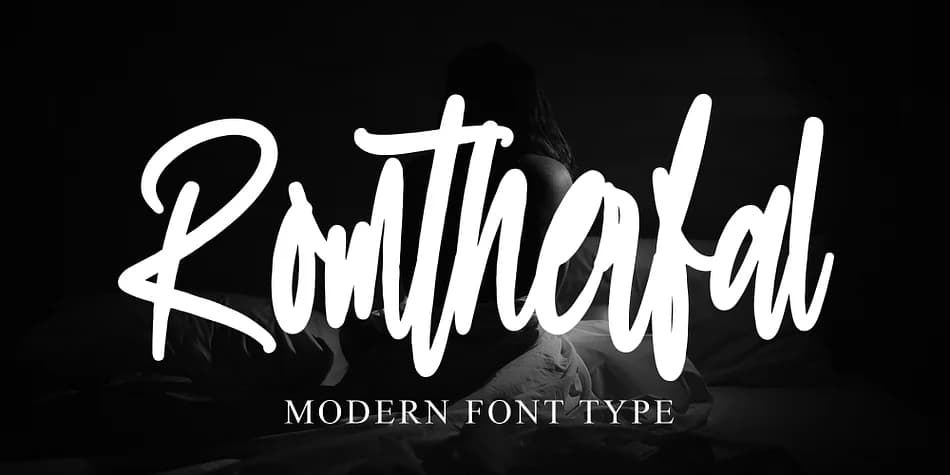
1 / 5About Romtherfal Font
Romtherfal by Ayska is a flowing calligraphic script that strikes a balance between elegance and contemporary appeal. The letterforms have that hand-drawn quality many designers chase, but with enough polish to work in refined contexts, not just casual ones. You'll find it works beautifully for wedding invitation suites, custom monogram designs, and upscale product labels that need a personal touch. It's also solid for social media graphics where you want to stand out from the serif-and-sans noise, or for personalized greeting cards that feel genuinely handwritten instead of mass-produced.
The script has good character coverage and flows naturally whether you're setting headlines or using it for body text in larger sizes. It's one of those fonts that rewards using it generously because the letterforms themselves are what make it interesting. Pair it with something clean and it becomes the hero, or use it solo for projects where handwritten elegance is the whole point. If you work with DIY wedding projects, boutique branding, personalized stationery, custom packaging, or anything that needs to feel made with intention rather than picked from a dropdown menu, Romtherfal deserves a spot in your collection. Grab it on Creative Fabrica and see where it takes your next project.
Style & Use Cases
- Overall Style
- Elegant, Flowing
- Use Case
- Invitations, Branding
- Ideal For
- wedding stationery, greeting cards, and signatures
- Pairs With
- a simple uppercase sans
How to Install Romtherfal Font
Step-by-step instructions for every platform
- 1Download the Romtherfal font file (.ttf or .otf).
- 2Locate the downloaded file in your Downloads folder.
- 3Right-click the font file.
- 4Select "Install" to install for the current user, or "Install for all users" to make it available system-wide.
- 5Romtherfal is now available in Word, Photoshop, Illustrator, and all other apps.
Browse fonts by theme
Curated collections →Saw a font in a picture? Identify any font from an image with our free Font Finder.
More Script Handwritten Fonts
Browse all →







What pairs well with Romtherfal Font?
Romtherfal Font is a script font that shines as a display or heading face. Pair it with a clean sans-serif or serif font for body text — the contrast creates a clear hierarchy while the two styles stay balanced and easy to read.



Romtherfal Font
by Ayska
Reviewed by the FontBoxDL team · Updated July 2026