 Firefox
 1 / 8
1 / 8About Retro Halloween Dingbats Font
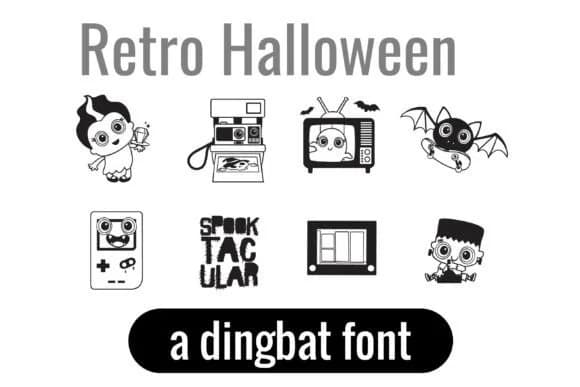
Retro Halloween Dingbats by Illustration Ink is a playful dingbat collection that channels 80s and 90s nostalgia with a spooky twist. This two-font set pairs vintage pop culture references, classic Halloween characters, and retro gadgets into one cohesive visual language that feels both eerie and genuinely charming.
You get two complete fonts loaded with character and personality. The collection features 52 illustrations covering everything from a ghost trapped in a vintage TV to a Frankenstein kid with wild hair, plus werewolves on roller skates, monsters jamming to vinyl records, and skeletons solving Rubik's cubes. The line work is bold and quirky, designed to stay crisp and clear whether you're making sticker designs or scaling up for merchandise like mugs and tote bags.
This works well for Halloween party invitations with a nostalgic edge, kids' activity sheets that lean into the retro theme, and scrapbooking layouts seeking vintage Halloween vibes without the kitschy feeling. The fonts translate cleanly to cutting machines, design software, and print, which means moving from concept to finished sticker sheets, custom apparel, or classroom displays is straightforward. Grab Retro Halloween Dingbats on Creative Fabrica to bring some quirky retro character to your Halloween work.
Style & Use Cases
- Overall Style
- Iconographic, Halloween
- Use Case
- Icons, Accents
- Ideal For
- ornaments, bullets, and decorative flourishes
- Pairs With
- any text font
How to Install Retro Halloween Dingbats Font
Step-by-step instructions for every platform
- 1Download the Retro Halloween Dingbats font file (.ttf or .otf).
- 2Locate the downloaded file in your Downloads folder.
- 3Right-click the font file.
- 4Select "Install" to install for the current user, or "Install for all users" to make it available system-wide.
- 5Retro Halloween Dingbats is now available in Word, Photoshop, Illustrator, and all other apps.
More by Illustration Ink
View all →



Browse fonts by theme
Curated collections →Saw a font in a picture? Identify any font from an image with our free Font Finder.
More Dingbats Fonts
Browse all →







What pairs well with Retro Halloween Dingbats Font?
Retro Halloween Dingbats Font is a versatile dingbats font that works for both headings and body text. Pair it with a contrasting sans-serif or serif font to add visual interest and a clear distinction between titles and body copy.



Retro Halloween Dingbats Font
Reviewed by the FontBoxDL team · Updated June 2026