
 1 / 8
1 / 8About Read Books Font
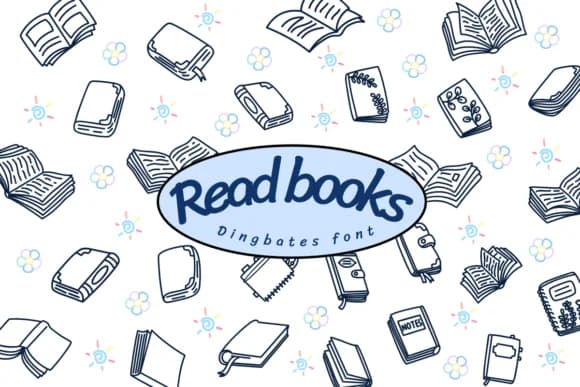
Each character in Read Books, a dingbat font by Chonada, is a hand-drawn book illustration. Rather than traditional letters, you're working with a visual set of book icons that range from stacked tomes to open pages, each rendered in crisp black and white with a clean, sketchy quality. This approach gives you a dedicated visual language for projects where books themselves carry meaningful design weight.
The font works well in several specific contexts. Educational worksheets, reading guides, and comprehension materials gain real value from having actual book imagery embedded in the layout. Book club materials, library shelf signage, and reading-themed social media graphics all benefit from the consistent illustration style. Bookstagram product labels, literary journal covers, thesis binding designs for literature programs, and scrapbook layouts that document reading histories naturally pair with this sketchy, hand-drawn aesthetic. The human-made quality consistently enhances craft projects where that visual character truly matters to the final piece.
Read Books fits projects that sit at the intersection of reading and visual design. The black-and-white line work translates equally well to both print production and digital layouts, maintaining clear visibility at any scale. Grab it from Creative Fabrica and add a bookish visual dimension to your next project.
Style & Use Cases
- Overall Style
- Iconographic, Book
- Use Case
- Icons, Accents
- Ideal For
- ornaments, bullets, and decorative flourishes
- Pairs With
- any text font
How to Install Read Books Font
Step-by-step instructions for every platform
- 1Download the Read Books font file (.ttf or .otf).
- 2Locate the downloaded file in your Downloads folder.
- 3Right-click the font file.
- 4Select "Install" to install for the current user, or "Install for all users" to make it available system-wide.
- 5Read Books is now available in Word, Photoshop, Illustrator, and all other apps.




Browse fonts by theme
Curated collections →Saw a font in a picture? Identify any font from an image with our free Font Finder.
More Dingbats Fonts
Browse all →







What pairs well with Read Books Font?
Read Books Font is a versatile dingbats font that works for both headings and body text. Pair it with a contrasting sans-serif or serif font to add visual interest and a clear distinction between titles and body copy.



Read Books Font
by Chonada
Reviewed by the FontBoxDL team · Updated June 2026