 Firefox
 1 / 8
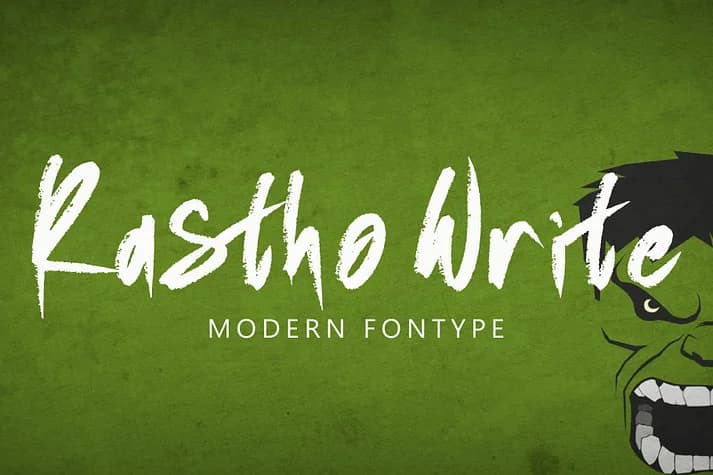
1 / 8About Rastho Write Font
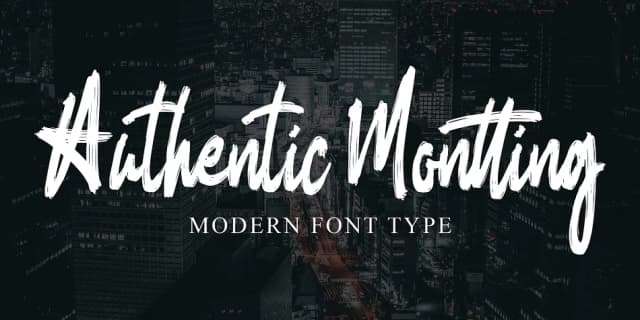
This font radiates raw edge and unpolished character. Rastho Write, created by Ayska, captures that handwritten vitality you get from quick marker sketches and organic brush strokes.
The script works brilliantly for album cover lettering, underground magazine headers, and vintage concert posters where precision takes a back seat to personality and impact. It's equally at home on DIY band merchandise, street art lettering projects, tattoo flash designs, and artist portfolio pieces that need to feel lived-in rather than templated. Every letterform carries its own organic rhythm thanks to the rough, textured brush finish, so nothing looks mass-produced or generic. The grunge aesthetic reads authentic because it genuinely mimics the imperfections of real handwriting rather than trying to smooth them away. This isn't a font pretending to be hand-done; it actually captures the energy of being hand-done.
Urban clothing lines and rebellion-themed packaging also benefit from this typeface's gritty confidence. It commands attention without shouting, speaking directly to audiences who value authenticity over polish. The typeface works beautifully at large scale and fits elegantly into tighter spaces. When you need legibility alongside the attitude, pair Rastho Write with a clean, minimal sans-serif to balance the density and create breathing room for your layouts. Find it on Creative Fabrica and bring genuine character to your next project.
Style & Use Cases
- Overall Style
- Elegant, Flowing
- Use Case
- Invitations, Branding
- Ideal For
- wedding stationery, greeting cards, and signatures
- Pairs With
- a simple uppercase sans
How to Install Rastho Write Font
Step-by-step instructions for every platform
- 1Download the Rastho Write font file (.ttf or .otf).
- 2Locate the downloaded file in your Downloads folder.
- 3Right-click the font file.
- 4Select "Install" to install for the current user, or "Install for all users" to make it available system-wide.
- 5Rastho Write is now available in Word, Photoshop, Illustrator, and all other apps.
Browse fonts by theme
Curated collections →Saw a font in a picture? Identify any font from an image with our free Font Finder.
More Script Handwritten Fonts
Browse all →







What pairs well with Rastho Write Font?
Rastho Write Font is a script font that shines as a display or heading face. Pair it with a clean sans-serif or serif font for body text — the contrast creates a clear hierarchy while the two styles stay balanced and easy to read.



Rastho Write Font
by Ayska
Reviewed by the FontBoxDL team · Updated July 2026