 Firefox
 1 / 4
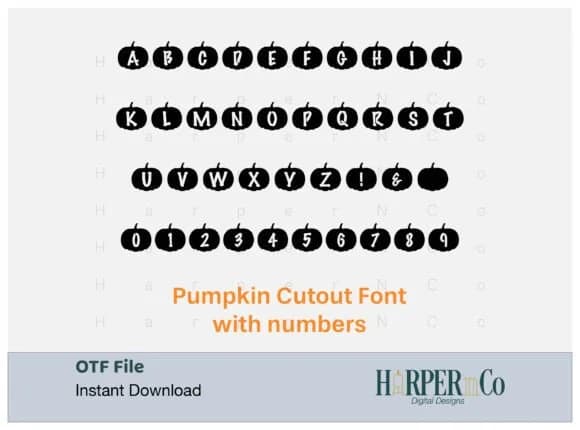
1 / 4About Pumpkin Cutout Font
What makes Pumpkin Cutout visually distinctive is its clever approach to structure: the pumpkins themselves form the character shape, with letters and numbers appearing as negative space carved through the orange silhouettes. Designed by HarperNCo, this dingbat creates the effect of hand-carved stencil type while keeping every character completely legible. The gourd shapes give it an authentically handcrafted feel, almost as if someone took a carving tool to actual jack-o-lanterns and froze each letter mid-creation.
This font excels on Halloween party invitations, seasonal product packaging, and Thanksgiving greeting cards where visual personality matters most. You'll find it works just as well for fall festival posters, pumpkin patch signage, autumn craft labels, and DIY decoration projects around the home. The consistent character sizing means it scales beautifully whether you're printing small labels or creating large display work, maintaining charm and readability at every scale without compromise.
Best suited for designers building festive seasonal projects that need genuine personality, Pumpkin Cutout brings authentic October energy to any layout. Whether you're creating a harvest celebration suite or adding autumn flair to packaging designs and promotional materials, this font delivers immediate visual impact without feeling contrived. Grab it on Creative Fabrica and start building your seasonal toolkit today.
Style & Use Cases
- Overall Style
- Iconographic, Otf File
- Use Case
- Icons, Accents
- Ideal For
- ornaments, bullets, and decorative flourishes
- Pairs With
- any text font
How to Install Pumpkin Cutout Font
Step-by-step instructions for every platform
- 1Download the Pumpkin Cutout font file (.ttf or .otf).
- 2Locate the downloaded file in your Downloads folder.
- 3Right-click the font file.
- 4Select "Install" to install for the current user, or "Install for all users" to make it available system-wide.
- 5Pumpkin Cutout is now available in Word, Photoshop, Illustrator, and all other apps.
More by HarperNCo
View all →

Browse fonts by theme
Curated collections →Saw a font in a picture? Identify any font from an image with our free Font Finder.
More Dingbats Fonts
Browse all →







What pairs well with Pumpkin Cutout Font?
Pumpkin Cutout Font is a versatile dingbats font that works for both headings and body text. Pair it with a contrasting sans-serif or serif font to add visual interest and a clear distinction between titles and body copy.



Pumpkin Cutout Font
by HarperNCo
Reviewed by the FontBoxDL team · Updated July 2026