 Firefox
 1 / 3
1 / 3About Printers in Marks Font
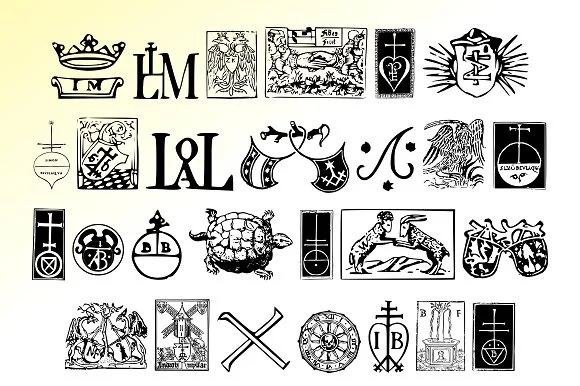
Printers in Marks by Proportional Lime is a dingbat typeface built from the publisher's marks of printing history. With over 160 glyphs sourced from legendary printers like Fust, Ratdolt, Manutius, and Caxton, this font gives you direct access to the symbols these craftspeople used to identify their work and establish reputation when printing was still a skilled craft, not an industrial process.
These marks served multiple purposes in the early printing world. They functioned as signatures on printed pages, guaranteeing the quality of a printer's work. Some of these historical figures took serious risks, preserving and publishing texts that powerful authorities wanted suppressed. Others focused on making classical knowledge available to ordinary people for the first time, fundamentally changing how learning was distributed. The technology of movable type enabled all of this, and these marks are the visual proof of that transformation.
Use this typeface for independent publisher book covers, rare book society materials, heritage museum branding, and vintage letterpress wedding stationery. Any project that needs authentic historical character draws strength from these genuine printing marks. Because they're sourced from real historical documents, they carry the kind of authenticity that contemporary design often searches for. Add this font to your library on Creative Fabrica and unlock a visual vocabulary from printing's earliest days.
Style & Use Cases
- Overall Style
- Iconographic
- Use Case
- Icons, Accents
- Ideal For
- ornaments, bullets, and decorative flourishes
- Pairs With
- any text font
How to Install Printers in Marks Font
Step-by-step instructions for every platform
- 1Download the Printers in Marks font file (.ttf or .otf).
- 2Locate the downloaded file in your Downloads folder.
- 3Right-click the font file.
- 4Select "Install" to install for the current user, or "Install for all users" to make it available system-wide.
- 5Printers in Marks is now available in Word, Photoshop, Illustrator, and all other apps.
More by Proportional Lime
View all →

Browse fonts by theme
Curated collections →Saw a font in a picture? Identify any font from an image with our free Font Finder.
More Dingbats Fonts
Browse all →







What pairs well with Printers in Marks Font?
Printers in Marks Font is a versatile dingbats font that works for both headings and body text. Pair it with a contrasting sans-serif or serif font to add visual interest and a clear distinction between titles and body copy.




Printers in Marks Font
Reviewed by the FontBoxDL team · Updated August 2026