 Firefox
 1 / 5
1 / 5About Prins Font
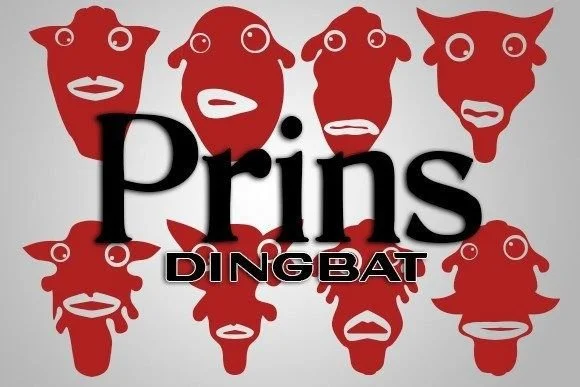
Prins hits that theatrical-meets-modern sweet spot that's surprisingly hard to find. Designer vladimirnikolic created this dingbat collection as a series of abstract mask faces that feel intentional rather than purely ornamental. Each character radiates personality without demanding a specific context.
For masquerade event invitations, these glyphs deliver immediate visual weight without relying on traditional decorative fonts. Carnival and Mardi Gras themed packaging catches eyes and holds attention, while theatrical poster design picks up an unmistakable sense of narrative and drama. Costume design branding works particularly well here because the abstraction transcends any single aesthetic, making these faces flexible across wildly different styles. Ready-made visual language appears in this collection for experimental music album artwork. Screen-printed apparel becomes far more interesting when you layer them into compositions that function as genuine design elements rather than surface ornament. From boutique mask-themed stationery to vintage carnival signage, these distinctive faces solve problems across multiple design contexts.
Pair this dingbat with a clean, minimal sans-serif for any surrounding text, keeping these faces as the visual anchor of your layout. The combination lets you balance attention and readability without diluting either. Find Prins on Creative Fabrica whenever your next project calls for abstract masks with real presence and character.
Style & Use Cases
- Overall Style
- Iconographic, Abstract Face
- Use Case
- Icons, Accents
- Ideal For
- ornaments, bullets, and decorative flourishes
- Pairs With
- any text font
How to Install Prins Font
Step-by-step instructions for every platform
- 1Download the Prins font file (.ttf or .otf).
- 2Locate the downloaded file in your Downloads folder.
- 3Right-click the font file.
- 4Select "Install" to install for the current user, or "Install for all users" to make it available system-wide.
- 5Prins is now available in Word, Photoshop, Illustrator, and all other apps.
More by vladimirnikolic
View all →


Browse fonts by theme
Curated collections →Saw a font in a picture? Identify any font from an image with our free Font Finder.
More Dingbats Fonts
Browse all →







What pairs well with Prins Font?
Prins Font is a versatile dingbats font that works for both headings and body text. Pair it with a contrasting sans-serif or serif font to add visual interest and a clear distinction between titles and body copy.




Prins Font
Reviewed by the FontBoxDL team · Updated July 2026