
 1 / 8
1 / 8About Present Font
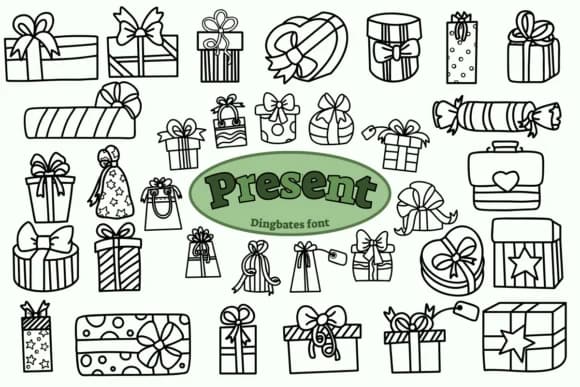
There's something instantly joyful about a font made entirely of wrapped packages and oversized bows. Present, designed by Chonada, gives you a complete collection of gift-shaped dingbats where every keystroke becomes a different present, ready to bring visual personality and festive flair to your creative work.
This font works wonderfully for decorating greeting card borders with stacked presents, creating custom tags for party favors and gift bags, or adding playful elements to gift wrap and package label designs. You might use it to dress up wedding favor packaging with elegant doodles, build festive social media graphics for seasonal promotions and holiday announcements, or add celebratory touches to DIY scrapbooking layouts and hand-drawn invitations. The characters render as clean, isolated present graphics, so they stack easily into repeating borders and patterns or work solo as inline icons and decorative accents scattered throughout your design work.
Pair it with a warm, modern serif or a friendly sans-serif for your body text to keep everything readable while these dingbats handle all the decorative heavy lifting. Pick up Present from Creative Fabrica and make those celebratory moments look as good as they feel.
Style & Use Cases
- Overall Style
- Iconographic, Doodle
- Use Case
- Icons, Accents
- Ideal For
- ornaments, bullets, and decorative flourishes
- Pairs With
- any text font
How to Install Present Font
Step-by-step instructions for every platform
- 1Download the Present font file (.ttf or .otf).
- 2Locate the downloaded file in your Downloads folder.
- 3Right-click the font file.
- 4Select "Install" to install for the current user, or "Install for all users" to make it available system-wide.
- 5Present is now available in Word, Photoshop, Illustrator, and all other apps.




Browse fonts by theme
Curated collections →Saw a font in a picture? Identify any font from an image with our free Font Finder.
More Dingbats Fonts
Browse all →







What pairs well with Present Font?
Present Font is a versatile dingbats font that works for both headings and body text. Pair it with a contrasting sans-serif or serif font to add visual interest and a clear distinction between titles and body copy.



Present Font
by Chonada
Reviewed by the FontBoxDL team · Updated June 2026