 Firefox
 1 / 7
1 / 7About Play More Font
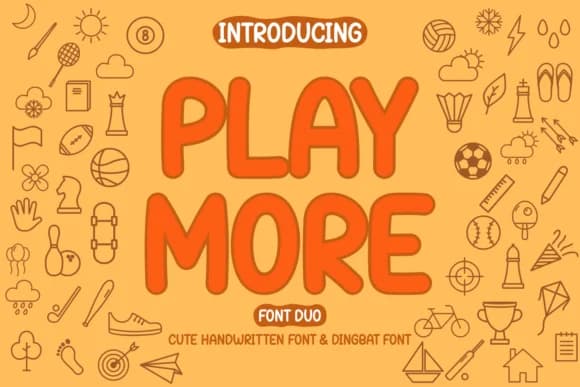
Play More by Rydmaker is a hand-drawn dingbat and display font duo that brings warmth to projects where personality matters most. The pairing works beautifully as a complete system: layer the decorative marks over headlines, or let each face stand on its own. Hand-crafted letterforms give the whole set a sketched, approachable feel that reads genuine rather than overly polished. Both faces share a minimalist sensibility that keeps them from feeling too cutesy or childish, making them surprisingly versatile across applications.
This duo shines in scrapbooking layouts where the dingbats can frame photos or add handmade flair to journaling spaces. Small-batch greeting card suites benefit from the pairing too, with the display handling text and the dingbats adding decorative flourishes. DIY craft labels and custom package design are perfect homes for this style, especially when you want something that feels intentional and made-by-hand. Magazine pull-quotes and feature spreads get a playful visual lift from the marks, while Etsy shop branding and social media graphics for creative businesses feel right at home here. The readable weight and sketch-like quality work even at smaller sizes, so the fonts stay effective whether you're going big or subtle.
Get Play More on Creative Fabrica and add both faces to your toolkit.
Style & Use Cases
- Overall Style
- Iconographic, Hand Drawn
- Use Case
- Icons, Accents
- Ideal For
- ornaments, bullets, and decorative flourishes
- Pairs With
- any text font
How to Install Play More Font
Step-by-step instructions for every platform
- 1Download the Play More font file (.ttf or .otf).
- 2Locate the downloaded file in your Downloads folder.
- 3Right-click the font file.
- 4Select "Install" to install for the current user, or "Install for all users" to make it available system-wide.
- 5Play More is now available in Word, Photoshop, Illustrator, and all other apps.
More by Rydmaker (7NTypes)
View all →

Browse fonts by theme
Curated collections →Saw a font in a picture? Identify any font from an image with our free Font Finder.
More Dingbats Fonts
Browse all →







What pairs well with Play More Font?
Play More Font is a versatile dingbats font that works for both headings and body text. Pair it with a contrasting sans-serif or serif font to add visual interest and a clear distinction between titles and body copy.



Play More Font
Reviewed by the FontBoxDL team · Updated July 2026