
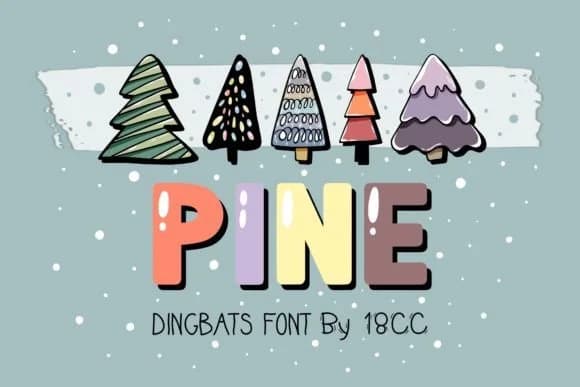
 1 / 6
1 / 6About Pine Font
Pine is a festive dingbat collection designed by DREAMs Soul G. that brings seasonal charm through its playful holiday-themed icons and decorative symbols. The hand-drawn letterforms have real personality while maintaining clarity across sizes, working equally well for large format displays and small intricate details alike, from oversized signage down to tiny embellishments on tags and labels.
This dingbat set excels when you need ornamental symbols that do the heavy lifting in seasonal design work. Holiday greeting cards and Christmas gift tags are natural fits, as are festive planner spreads and DIY gift wrap designs that call for character without fussiness. The font translates cleanly across Procreate, Affinity Designer, and other creative software you rely on, handling both digital output and print formats with equal grace. Seasonal packaging labels, scrapbooking layouts, and even social media graphics gain visual interest from Pine's carefully curated symbol collection.
Designers working on holiday projects and festive stationery will find this collection essential to their toolkit. Its symbols add genuine personality to every seasonal layout, the kind of detail that makes clients and audiences genuinely notice your work. Grab Pine on Creative Fabrica to bring that year-round seasonal versatility into every project you create.
Style & Use Cases
- Overall Style
- Iconographic, Fonts
- Use Case
- Icons, Accents
- Ideal For
- ornaments, bullets, and decorative flourishes
- Pairs With
- any text font
How to Install Pine Font
Step-by-step instructions for every platform
- 1Download the Pine font file (.ttf or .otf).
- 2Locate the downloaded file in your Downloads folder.
- 3Right-click the font file.
- 4Select "Install" to install for the current user, or "Install for all users" to make it available system-wide.
- 5Pine is now available in Word, Photoshop, Illustrator, and all other apps.
More by DREAMs Soul G.
View all →
Browse fonts by theme
Curated collections →Saw a font in a picture? Identify any font from an image with our free Font Finder.
More Dingbats Fonts
Browse all →







What pairs well with Pine Font?
Pine Font is a versatile dingbats font that works for both headings and body text. Pair it with a contrasting sans-serif or serif font to add visual interest and a clear distinction between titles and body copy.



Pine Font
Reviewed by the FontBoxDL team · Updated July 2026