
 1 / 8
1 / 8About Piggy Font
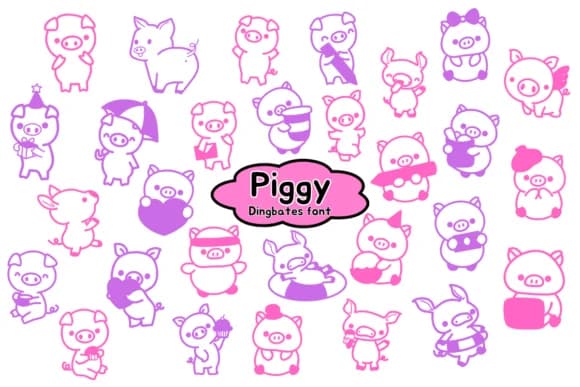
You're designing a charming savings tracker graphic for a budgeting Instagram account and need icons that feel playful and approachable. Piggy, designed by Chonada, is a dingbat font built to fill exactly this role. It brings genuine character to financial-themed projects through a collection of pig motifs and money-related symbols that work both standalone and layered into larger compositions.
This font shines in contexts like farm-themed party invitations, children's piggy bank labels, DIY farmhouse sign projects, and coin-focused social media templates. Each glyph is clear and readable whether you're enlarging it for poster work or scaling down for small product stickers and labels. The symbols function as a complete visual language rather than scattered decorative elements, which makes them easy to build consistent designs around.
What sets Piggy apart is how naturally the concept translates across different applications. You can build logos with it, weave these icons through scrapbook pages, create custom packaging for handmade goods, or use individual glyphs as section breaks in printed materials. The lines hold their shape and readability at any scale, from poster-size enlargements down to tiny label details. Find Piggy on Creative Fabrica and add this playful symbol set to your toolkit.
Style & Use Cases
- Overall Style
- Iconographic, Horizontal
- Use Case
- Icons, Accents
- Ideal For
- ornaments, bullets, and decorative flourishes
- Pairs With
- any text font
How to Install Piggy Font
Step-by-step instructions for every platform
- 1Download the Piggy font file (.ttf or .otf).
- 2Locate the downloaded file in your Downloads folder.
- 3Right-click the font file.
- 4Select "Install" to install for the current user, or "Install for all users" to make it available system-wide.
- 5Piggy is now available in Word, Photoshop, Illustrator, and all other apps.
Browse fonts by theme
Curated collections →Saw a font in a picture? Identify any font from an image with our free Font Finder.
More Dingbats Fonts
Browse all →







What pairs well with Piggy Font?
Piggy Font is a versatile dingbats font that works for both headings and body text. Pair it with a contrasting sans-serif or serif font to add visual interest and a clear distinction between titles and body copy.



Piggy Font
by Chonada
Reviewed by the FontBoxDL team · Updated July 2026