 Firefox
 1 / 3
1 / 3Loading font…
About Picto Peeps Font
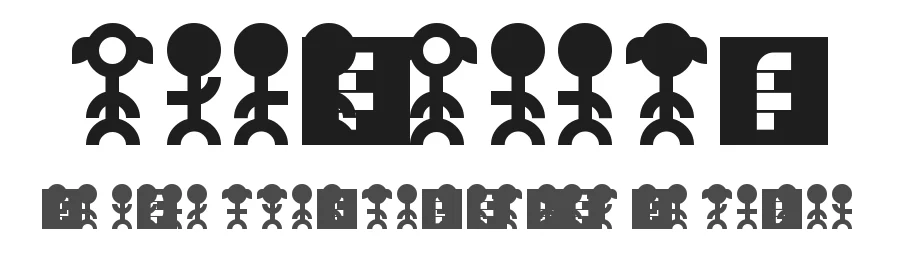
Picto Peeps is a dingbat font containing 41 character icons designed by crispycraker. This Regular weight typeface from Fontstruct provides a carefully curated set of pictographic elements intended for adding visual interest to projects that rely on symbol-based communication. The font works particularly well for decorative accents in greeting cards, custom stickers for print-on-demand services, bullet points in handmade scrapbook layouts, and simple infographic elements embedded within broader design compositions.
As a dingbat typeface, Picto Peeps functions as a bridge between traditional letter-based typography and custom illustration work. Rather than requiring designers to draw icons from scratch or source them from separate image libraries, this font delivers pre-designed symbols that integrate directly into standard text workflows and design applications. This approach makes it especially valuable for crafters and hobbyists working with accessible design software or undertaking print-at-home projects where consistency and rapid iteration matter more than highly customized artwork.
The font is available free for personal use only, with commercial licensing available through the designer. Choose Picto Peeps when you need a practical icon solution that doesn't require learning new specialized software or when your project calls for this specific character set rather than relying on more generic symbol fonts.
Style & Use Cases
- Overall Style
- Iconographic, Dingbats
- Use Case
- Icons, Accents
- Ideal For
- ornaments, bullets, and decorative flourishes
- Pairs With
- any text font
Picto Peeps Specifications
| Font Family | PictoPeeps |
| Style | Regular |
| Full Name | PictoPeeps Regular |
| Version | 1.0 |
| Weight | 400 (Regular) |
| Glyph Count | 41 glyphs |
| PostScript Name | PictoPeeps |
| Designer | Ken Bruce |
| Format | TTF (TrueType) |
| File Size | 15.8 KB |
How to Install Picto Peeps Font
Step-by-step instructions for every platform
- 1Download the Picto Peeps font file (.ttf or .otf).
- 2Locate the downloaded file in your Downloads folder.
- 3Right-click the font file.
- 4Select "Install" to install for the current user, or "Install for all users" to make it available system-wide.
- 5Picto Peeps is now available in Word, Photoshop, Illustrator, and all other apps.
More by crispycraker
View all →
Browse fonts by theme
Curated collections →Saw a font in a picture? Identify any font from an image with our free Font Finder.
More Dingbats Fonts
Browse all →







What pairs well with Picto Peeps Font?
Picto Peeps Font is a versatile dingbats font that works for both headings and body text. Pair it with a contrasting sans-serif or serif font to add visual interest and a clear distinction between titles and body copy.




Premium Dingbats Fonts
★ PremiumWant something with more weights, glyphs, and commercial polish? These premium dingbats fonts are worth a look.
Picto Peeps Font
by crispycraker
Reviewed by the FontBoxDL team · Updated October 2026
License: Free for personal use