 Firefox
 1 / 8
1 / 8About Perfume Doodle Font
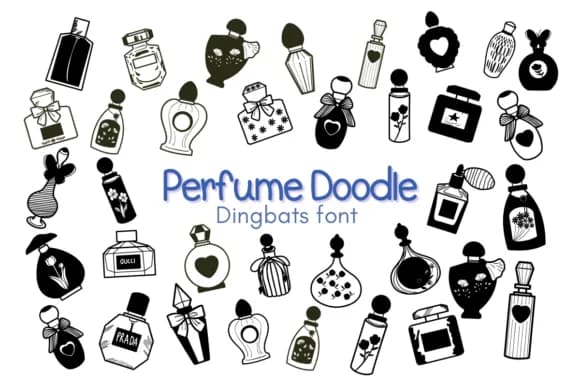
The playful ornamental characters in Perfume Doodle by Nun Sukhwan capture hand-drawn charm through delicate flowers, fashion sketches, and vintage flourishes that feel genuinely intentional rather than generic decorative filler. As a dingbat font, it excels at transforming plain text into whimsical visual anchors, giving each design layer genuine personality and warmth. The letterforms have a sketchy, slightly irregular quality that adds character and authenticity without feeling clumsy or amateurish.
Wedding invitation suites and handcrafted stationery become far more engaging when these glyphs layer with calligraphy typefaces for a cohesive, artisanal aesthetic. DIY skincare labels, botanical stickers, and Etsy product packaging all benefit from the vintage sensibility woven throughout each ornament. Teachers, craft enthusiasts, and indie brand designers reach for this font when building playful logos, classroom bulletin board displays, and product packaging that doesn't read as mass-produced. Pair it with serif and sans-serif typefaces, or use it independently as a decorative accent between text blocks and sections.
Perfume Doodle suits makers and designers building projects with a handcrafted, whimsical aesthetic. Grab the complete character set on Creative Fabrica and add these ornamental flourishes to your next creative work or design brief.
Style & Use Cases
- Overall Style
- Iconographic, Dingbats Font
- Use Case
- Icons, Accents
- Ideal For
- ornaments, bullets, and decorative flourishes
- Pairs With
- any text font
How to Install Perfume Doodle Font
Step-by-step instructions for every platform
- 1Download the Perfume Doodle font file (.ttf or .otf).
- 2Locate the downloaded file in your Downloads folder.
- 3Right-click the font file.
- 4Select "Install" to install for the current user, or "Install for all users" to make it available system-wide.
- 5Perfume Doodle is now available in Word, Photoshop, Illustrator, and all other apps.
More by Nun Sukhwan
View all →



Browse fonts by theme
Curated collections →Saw a font in a picture? Identify any font from an image with our free Font Finder.
More Dingbats Fonts
Browse all →







What pairs well with Perfume Doodle Font?
Perfume Doodle Font is a versatile dingbats font that works for both headings and body text. Pair it with a contrasting sans-serif or serif font to add visual interest and a clear distinction between titles and body copy.



Perfume Doodle Font
by Nun Sukhwan
Reviewed by the FontBoxDL team · Updated July 2026