
 1 / 8
1 / 8About Party Flag Doodle Font
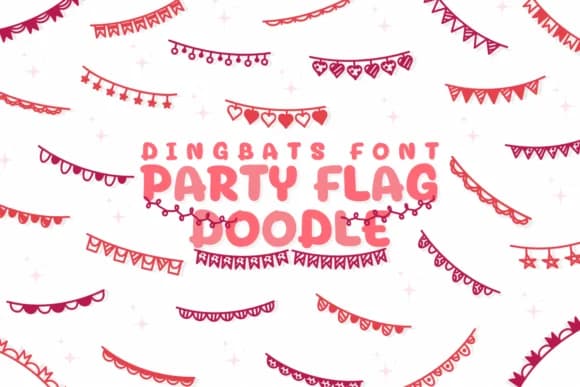
Chonada's Party Flag Doodle brings hand-sketched charm to your designs through playful dingbat symbols that read like little celebration markers scattered across a page. This collection of cartoon-style flags and festive elements captures the visual energy of parties and gatherings in a casual, approachable way that feels genuinely handmade rather than computer-generated.
The icons function as isolated decorative accents that you can layer into larger compositions or use as standalone embellishments. Wedding invitation suites gain instant personality when you scatter these hand-drawn elements as borders, corner details, or text separators. For DIY scrapbooking pages, they provide exactly the kind of whimsical flourish that fills blank spaces without overwhelming photos and text. Party and carnival poster designs benefit from the vector-based construction, which means you can scale these symbols up or down without losing clarity. Birthday garland designs and event signage also come alive with these doodle-style decorations, each icon feeling intentional rather than clip-art generic.
This font suits anyone creating celebration-focused materials who wants that handmade feel without sketching every element from scratch. Grab Party Flag Doodle on Creative Fabrica and start adding these festive accents to your next event or party project.
Style & Use Cases
- Overall Style
- Iconographic, Party Flag
- Use Case
- Icons, Accents
- Ideal For
- ornaments, bullets, and decorative flourishes
- Pairs With
- any text font
How to Install Party Flag Doodle Font
Step-by-step instructions for every platform
- 1Download the Party Flag Doodle font file (.ttf or .otf).
- 2Locate the downloaded file in your Downloads folder.
- 3Right-click the font file.
- 4Select "Install" to install for the current user, or "Install for all users" to make it available system-wide.
- 5Party Flag Doodle is now available in Word, Photoshop, Illustrator, and all other apps.
Browse fonts by theme
Curated collections →Saw a font in a picture? Identify any font from an image with our free Font Finder.
More Dingbats Fonts
Browse all →







What pairs well with Party Flag Doodle Font?
Party Flag Doodle Font is a versatile dingbats font that works for both headings and body text. Pair it with a contrasting sans-serif or serif font to add visual interest and a clear distinction between titles and body copy.



Party Flag Doodle Font
by Chonada
Reviewed by the FontBoxDL team · Updated July 2026