 Firefox
 1 / 8
1 / 8About Outline Block Font
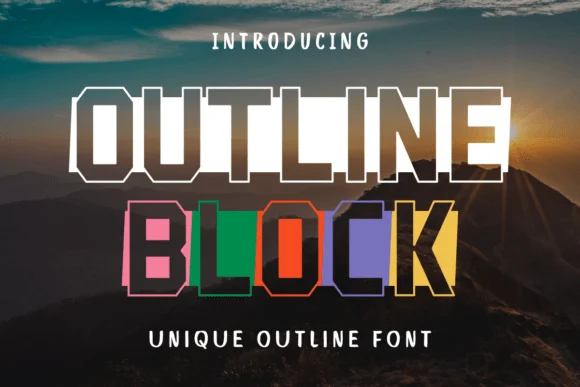
Picture a college event where one typeface needs to command attention across an entire gymnasium. Outline Block, designed by Eystore, fills that role with unmistakable authority. This slab-serif varsity font combines chunky block proportions with outline letterforms, creating a look that works brilliantly for college apparel graphics, vintage sports team logos, athletic event posters, and oversized merchandise labels where visual weight matters as much as legibility and presence.
The thick geometric structure shines on marching band promotional designs, retro sports event programs, and DIY athletic signage where the typeface does the heavy lifting without needing support. At large sizes, the outline treatment keeps the letters from looking muddy while maintaining that classic varsity character that reads from across the room. Consistent stroke weight makes it equally suitable for logos and headlines, giving you a reliable option whether your next project needs to hit print or live on screen.
Outline Block performs best when given room to breathe at larger point sizes, where the block geometry fully expresses itself. Its strength is in that unadorned simplicity, just solid letterforms doing their job. You'll get dependable results across applications, from digital mockups to print. Grab it from Creative Fabrica and bring that timeless athletic typography to your next project.
Style & Use Cases
- Overall Style
- Sturdy, Confident, Varsity Font
- Use Case
- Headlines, Merch
- Ideal For
- vintage posters, logos, and product packaging
- Pairs With
- a light sans-serif
How to Install Outline Block Font
Step-by-step instructions for every platform
- 1Download the Outline Block font file (.ttf or .otf).
- 2Locate the downloaded file in your Downloads folder.
- 3Right-click the font file.
- 4Select "Install" to install for the current user, or "Install for all users" to make it available system-wide.
- 5Outline Block is now available in Word, Photoshop, Illustrator, and all other apps.
More by Eystore
View all →
Browse fonts by theme
Curated collections →Saw a font in a picture? Identify any font from an image with our free Font Finder.
More Slab Serif Fonts
Browse all →







What pairs well with Outline Block Font?
Outline Block Font is a slab serif font that shines as a display or heading face. Pair it with a clean sans-serif or serif font for body text — the contrast creates a clear hierarchy while the two styles stay balanced and easy to read.




Outline Block Font
by Eystore
Reviewed by the FontBoxDL team · Updated September 2026