 Firefox
 1 / 10
About Noola Font
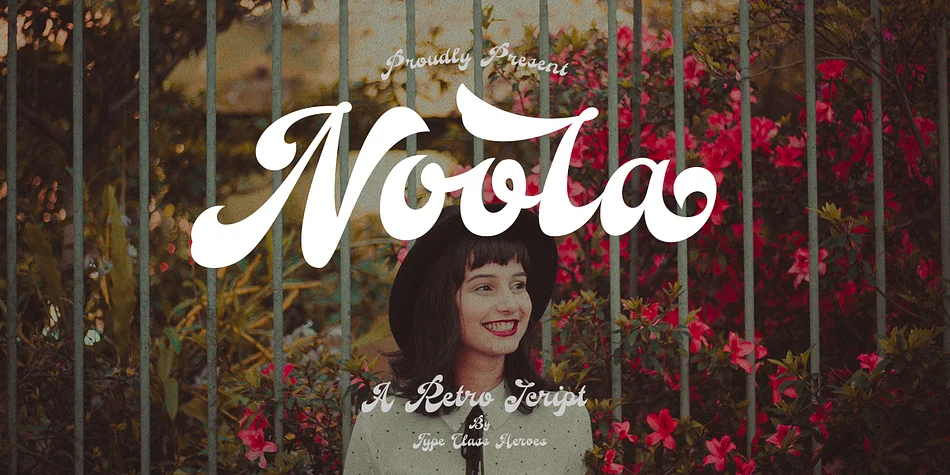
This typeface captures that nostalgic, slightly playful energy of mid-century design. Noola, created by TypeClassHeroes, is a script font with strong 60's sensibilities that manages to feel both retro and polished at the same time. The letterforms have a natural rhythm that reads comfortably even at large sizes, so you're not just adding atmosphere; you're building something that actually works on the page. What makes it special is how it balances a handwritten feel with enough refinement to work confidently in serious professional contexts without feeling kitschy.
The font excels for vintage album artwork and promotional posters, mid-century brand identity systems, retro diner menus and vintage signage, and 1960s-inspired wedding invitation suites. This technical package includes OTF and TTF files, WOFF variants for web use, uppercase and lowercase letters, numbers, symbols, international character support, multiple alternates, and built-in ligatures for smooth letter combinations. Multilingual support makes it viable for international projects without any compromises to the character set.
Pair it with a clean, contemporary sans-serif for body text to let Noola serve as a strong display element without overwhelming your layout or sacrificing legibility. You'll find it on Creative Fabrica whenever you're ready to add authentic retro character to your next design.
Style & Use Cases
- Overall Style
- Elegant, Flowing
- Use Case
- Invitations, Branding
- Ideal For
- wedding stationery, greeting cards, and signatures
- Pairs With
- a simple uppercase sans
How to Install Noola Font
Step-by-step instructions for every platform
- 1Download the Noola font file (.ttf or .otf).
- 2Locate the downloaded file in your Downloads folder.
- 3Right-click the font file.
- 4Select "Install" to install for the current user, or "Install for all users" to make it available system-wide.
- 5Noola is now available in Word, Photoshop, Illustrator, and all other apps.
More by TypeClassHeroes
View all →
Browse fonts by theme
Curated collections →Saw a font in a picture? Identify any font from an image with our free Font Finder.
More Script Handwritten Fonts
Browse all →







What pairs well with Noola Font?
Noola Font is a script font that shines as a display or heading face. Pair it with a clean sans-serif or serif font for body text — the contrast creates a clear hierarchy while the two styles stay balanced and easy to read.




Noola Font
Reviewed by the FontBoxDL team · Updated July 2026