 Firefox
 1 / 5
1 / 5About Nocturne Font
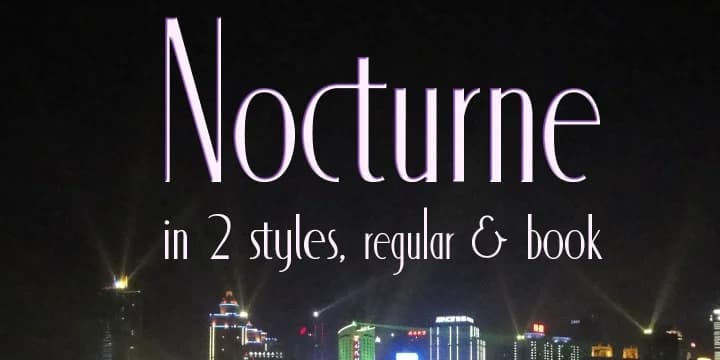
Imagine you're designing a luxury brand identity for a high-end jewelry retailer or a 1920s-themed cocktail bar. You reach for Nocturne, Scholtz Fonts' decorative typeface born from an obscure Art Deco alphabet discovered in a mid-1920s design manual. The original sketches, created by Paul Carlyle and Guy Oring, featured delicate tapering strokes, but Scholtz streamlined the design for contemporary use by converting irregular curves into clean, parallel lines that preserve the era's sophistication.
This typeface carries the unmistakable glamour of 1930s graphic design, evoking the romantic, refined aesthetic of the interwar years. Nocturne ships in two weights, each engineered for a specific role. The Regular version adheres to the Art Deco convention of a small x-height with tall ascenders, making it shine on upscale wine bottle labels, luxury hotel signage, vintage theater posters, and artisanal cosmetics packaging. Book weight increases the x-height and slightly widens the letters, providing comfortable readability for body text without compromising the font's elegant character.
Nocturne adapts beautifully across display and text sizes alike. Find it on Creative Fabrica and inject that golden-age glamour into your next project.
Style & Use Cases
- Overall Style
- Bold, Distinctive
- Use Case
- Headlines, Posters
- Ideal For
- logos, packaging, and standout titles
- Pairs With
- a neutral sans-serif
How to Install Nocturne Font
Step-by-step instructions for every platform
- 1Download the Nocturne font file (.ttf or .otf).
- 2Locate the downloaded file in your Downloads folder.
- 3Right-click the font file.
- 4Select "Install" to install for the current user, or "Install for all users" to make it available system-wide.
- 5Nocturne is now available in Word, Photoshop, Illustrator, and all other apps.
More by Scholtz Fonts
View all →

Browse fonts by theme
Curated collections →Saw a font in a picture? Identify any font from an image with our free Font Finder.
More Decorative Fonts
Browse all →







What pairs well with Nocturne Font?
Nocturne Font is a decorative font that shines as a display or heading face. Pair it with a clean sans-serif or serif font for body text — the contrast creates a clear hierarchy while the two styles stay balanced and easy to read.



Nocturne Font
Reviewed by the FontBoxDL team · Updated June 2026