 Firefox
 1 / 5
1 / 5About My Star Font
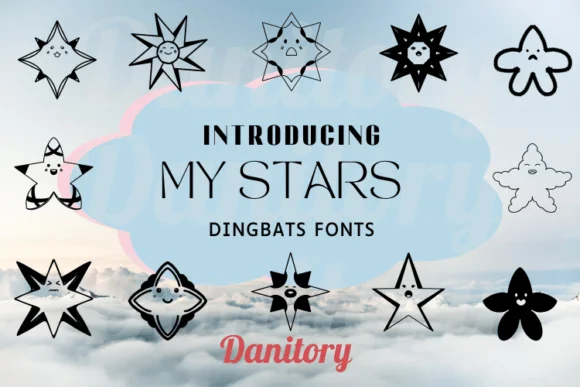
My Star by danita.kukkai is a hand-drawn dingbats font built entirely around a playful collection of star shapes. Each glyph carries a sketchy, organic quality that gives your designs an immediately approachable, handmade feel without requiring you to actually hand-letter anything yourself. The doodle-style lines feel homemade and intentional, making this ideal for designs that value warmth and personality over formal polish.
This font excels in bullet journal spreads, where the stars add personality to section dividers, rating systems, and page headers. It's equally useful for DIY planner stickers, custom scrapbook layouts, gift tag designs, and wedding invitation suites where you want ornamental flourishes that feel considered rather than generic. Craft project labels and handmade product packaging both gain immediate visual interest from the doodled glyph set, while the varied star options give you flexibility depending on your layout direction.
Because this typeface consists entirely of star variations, you get multiple options to choose from when building out your design. The hand-drawn nature of each glyph means they maintain personality at virtually any size, whether you're setting them large as focal points or smaller as repeating background patterns. Grab My Star on Creative Fabrica and bring a touch of deliberate charm to your next project.
Style & Use Cases
- Overall Style
- Iconographic, Star Font
- Use Case
- Icons, Accents
- Ideal For
- ornaments, bullets, and decorative flourishes
- Pairs With
- any text font
How to Install My Star Font
Step-by-step instructions for every platform
- 1Download the My Star font file (.ttf or .otf).
- 2Locate the downloaded file in your Downloads folder.
- 3Right-click the font file.
- 4Select "Install" to install for the current user, or "Install for all users" to make it available system-wide.
- 5My Star is now available in Word, Photoshop, Illustrator, and all other apps.
More by danita.kukkai
View all →
Browse fonts by theme
Curated collections →Saw a font in a picture? Identify any font from an image with our free Font Finder.
More Dingbats Fonts
Browse all →







What pairs well with My Star Font?
My Star Font is a versatile dingbats font that works for both headings and body text. Pair it with a contrasting sans-serif or serif font to add visual interest and a clear distinction between titles and body copy.




My Star Font
Reviewed by the FontBoxDL team · Updated July 2026