 Firefox
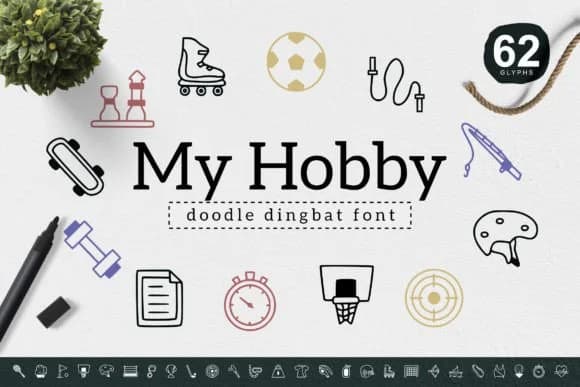 1 / 6
1 / 6About My Hobby Font
There's something genuinely inviting about these icons, like they're sketched by hand and full of personality. My Hobby, created by YandiDesigns, is a dingbats font built on simple line work and charming object illustrations that feel personally crafted rather than templated.
This thoughtful handmade aesthetic makes the character set valuable for work where warmth and approachability matter more than sleek minimalism. Hand-drawn sticker sheet layouts benefit from the organic quality, as do embroidery reference guides where readability at small sizes is critical. Children's book spot illustrations, scrapbooking page borders, and greeting card icon arrangements all find natural homes with My Hobby's visual vocabulary. DIY craft project markers and kid-friendly classroom signage work particularly well because the simple geometric foundation reads clearly without requiring precision placement or fussy alignment. The linework holds up whether you're working at thumbnail scale or sizing up for posters and large signage.
For mixed layouts where icons and text coexist, pair My Hobby with a neutral sans-serif typeface like Nunito or Poppins. This combination lets the hand-drawn icons carry the visual interest while keeping body copy grounded and readable. You'll find My Hobby on Creative Fabrica, ready to add genuine handmade character to your design toolkit.
Style & Use Cases
- Overall Style
- Iconographic, My Hobby
- Use Case
- Icons, Accents
- Ideal For
- ornaments, bullets, and decorative flourishes
- Pairs With
- any text font
How to Install My Hobby Font
Step-by-step instructions for every platform
- 1Download the My Hobby font file (.ttf or .otf).
- 2Locate the downloaded file in your Downloads folder.
- 3Right-click the font file.
- 4Select "Install" to install for the current user, or "Install for all users" to make it available system-wide.
- 5My Hobby is now available in Word, Photoshop, Illustrator, and all other apps.
More by YandiDesigns
View all →
Browse fonts by theme
Curated collections →Saw a font in a picture? Identify any font from an image with our free Font Finder.
More Dingbats Fonts
Browse all →







What pairs well with My Hobby Font?
My Hobby Font is a versatile dingbats font that works for both headings and body text. Pair it with a contrasting sans-serif or serif font to add visual interest and a clear distinction between titles and body copy.



My Hobby Font
by YandiDesigns
Reviewed by the FontBoxDL team · Updated July 2026