 Firefox
 1 / 5
1 / 5About Mobile Icons Font
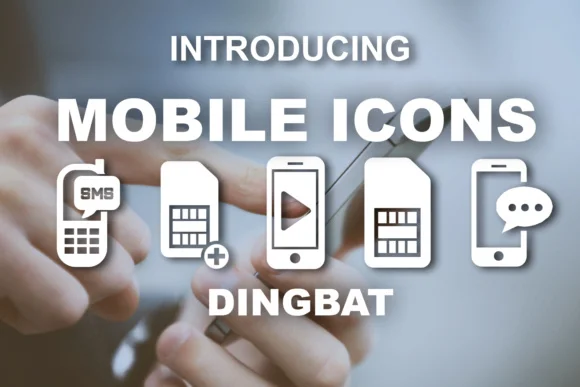
This typeface communicates in the language of apps and digital interfaces. Mobile Icons, designed by vladimirnikolic, is a dingbats collection that solves a genuine problem: you need visual shortcuts for tech-focused work without hunting through multiple graphic assets or building custom icons from scratch. The set delivers smartphone, tablet, and device icons that feel native to modern design systems and digital products alike.
Use it for app interface annotations where instant visual recognition matters, startup pitch deck graphics that need crisp and legible iconography, and social media content promoting tech products or services. Design system documentation benefits particularly well, since designers and developers can reference icons built directly into a single typeface rather than scattered across files or external libraries. Newsletter headers, digital publication layouts, and UI kit mockups all get noticeably cleaner when these icons are immediately available.
The straightforward icon collection pairs beautifully with a contemporary sans-serif like Inter or Poppins for body text and labels, keeping your overall layouts breathable without unnecessary visual weight. Find Mobile Icons on Creative Fabrica and add this practical, efficient tool to your design library.
Style & Use Cases
- Overall Style
- Iconographic
- Use Case
- Icons, Accents
- Ideal For
- ornaments, bullets, and decorative flourishes
- Pairs With
- any text font
How to Install Mobile Icons Font
Step-by-step instructions for every platform
- 1Download the Mobile Icons font file (.ttf or .otf).
- 2Locate the downloaded file in your Downloads folder.
- 3Right-click the font file.
- 4Select "Install" to install for the current user, or "Install for all users" to make it available system-wide.
- 5Mobile Icons is now available in Word, Photoshop, Illustrator, and all other apps.
More by vladimirnikolic
View all →



Browse fonts by theme
Curated collections →Saw a font in a picture? Identify any font from an image with our free Font Finder.
More Dingbats Fonts
Browse all →







What pairs well with Mobile Icons Font?
Mobile Icons Font is a versatile dingbats font that works for both headings and body text. Pair it with a contrasting sans-serif or serif font to add visual interest and a clear distinction between titles and body copy.




Mobile Icons Font
Reviewed by the FontBoxDL team · Updated July 2026