 Firefox
 1 / 5
1 / 5About Mini Arrows Font
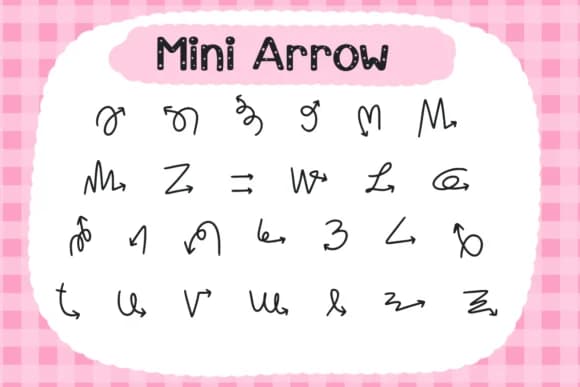
These arrows carry a sketched, hand-drawn feel that brings casual energy to any layout without getting too stylized or rigid. Mini Arrows is a dingbats collection from Foam-Design Store, built around directional marks in multiple weights and angles so you can match the right stroke weight to each specific design moment. The variety in the font lets you layer arrows flexibly across different scenarios and contexts without any visual repetition.
Bullet journal spreads work beautifully with these as visual guides between sections, creating movement and rhythm without adding unnecessary bulk to the page. Email newsletters use them effectively for calls-to-action where a subtle directional cue draws attention more naturally than a text button ever could. Product labels and packaging for handmade goods or indie brands feel more genuine when hand-drawn arrows accent the brand mark and reinforce the maker's distinctive voice. Workbook and worksheet layouts gain strength when you use arrows to connect ideas or highlight activity sequences for students or learners.
The hand-drawn character works in both casual and professional settings without feeling out of place or overdone. Combine this with a clean, restrained sans-serif for text passages, letting the arrows carry your design's visual personality. You'll find Mini Arrows on Creative Fabrica.
Style & Use Cases
- Overall Style
- Iconographic, Arrow
- Use Case
- Icons, Accents
- Ideal For
- ornaments, bullets, and decorative flourishes
- Pairs With
- any text font
How to Install Mini Arrows Font
Step-by-step instructions for every platform
- 1Download the Mini Arrows font file (.ttf or .otf).
- 2Locate the downloaded file in your Downloads folder.
- 3Right-click the font file.
- 4Select "Install" to install for the current user, or "Install for all users" to make it available system-wide.
- 5Mini Arrows is now available in Word, Photoshop, Illustrator, and all other apps.
More by Foam-Design Store
View all →

Browse fonts by theme
Curated collections →Saw a font in a picture? Identify any font from an image with our free Font Finder.
More Dingbats Fonts
Browse all →







What pairs well with Mini Arrows Font?
Mini Arrows Font is a versatile dingbats font that works for both headings and body text. Pair it with a contrasting sans-serif or serif font to add visual interest and a clear distinction between titles and body copy.



Mini Arrows Font
Reviewed by the FontBoxDL team · Updated August 2026