 Firefox
 1 / 8
1 / 8About Merry Monster Holiday Dingbats Font
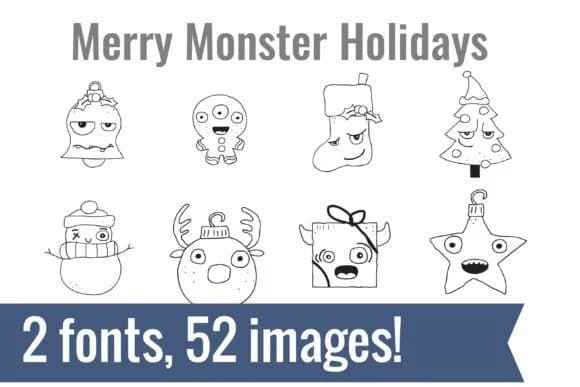
Hand-drawn monster characters with wonky eyes and goofy expressions give the Merry Monster Holiday Dingbats by Illustration Ink a distinctly playful energy that breaks from typical seasonal imagery. This dingbat collection features quirky, sketchy creatures that feel personal and deliberately imperfect. You get 52 unique glyphs, each with distinct character: a one-eyed ornament, a wide-eyed snowman, a multi-horned gift box, a stern-faced stocking, and plenty of other festive beings that read as mischievous rather than spooky.
With a dingbat font, you're working with pre-made graphics built into each keystroke. Install the typeface, type a letter, and a complete illustration appears instantly. That approach makes it fast to build designs for holiday greeting cards, vinyl decal projects, teacher resource printables, school bulletin board displays, and planner inserts without hunting through icon libraries. The hand-drawn style also pairs well with cardstock and paper crafts, giving that personal touch clip art can rarely achieve.
This collection works best for makers who prefer character over polish: teachers building classroom materials, crafters making personalized gifts, event planners creating playful invitations, and anyone lettering signs or cards for younger audiences. Merry Monster Holiday Dingbats is available on Creative Fabrica.
Style & Use Cases
- Overall Style
- Iconographic, Christmas Font
- Use Case
- Icons, Accents
- Ideal For
- ornaments, bullets, and decorative flourishes
- Pairs With
- any text font
How to Install Merry Monster Holiday Dingbats Font
Step-by-step instructions for every platform
- 1Download the Merry Monster Holiday Dingbats font file (.ttf or .otf).
- 2Locate the downloaded file in your Downloads folder.
- 3Right-click the font file.
- 4Select "Install" to install for the current user, or "Install for all users" to make it available system-wide.
- 5Merry Monster Holiday Dingbats is now available in Word, Photoshop, Illustrator, and all other apps.
More by Illustration Ink
View all →



Browse fonts by theme
Curated collections →Saw a font in a picture? Identify any font from an image with our free Font Finder.
More Dingbats Fonts
Browse all →







What pairs well with Merry Monster Holiday Dingbats Font?
Merry Monster Holiday Dingbats Font is a versatile dingbats font that works for both headings and body text. Pair it with a contrasting sans-serif or serif font to add visual interest and a clear distinction between titles and body copy.



Merry Monster Holiday Dingbats Font
Reviewed by the FontBoxDL team · Updated July 2026