
 1 / 8
1 / 8About Meat Font
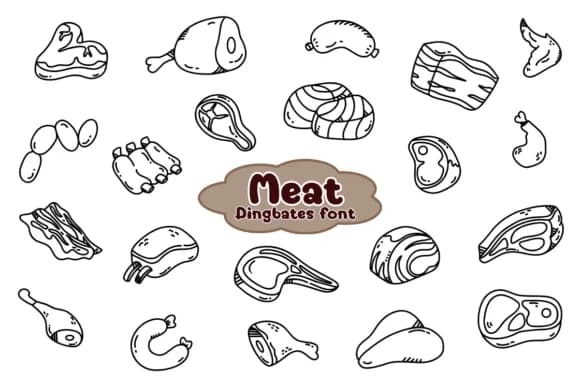
Meat is Chonada's dingbat collection of hand-drawn meat cuts and charcuterie illustrations, functioning like a specialized icon set rather than traditional letter forms. Each character depicts a different cut of beef, pork, poultry, or processed meat in sketchy vector style that reads as both authentic and approachable. Beyond basic recognition, the loose linework gives these icons personality while keeping them instantly readable.
For food industry designers, this collection solves a real problem. Butcher shop branding becomes straightforward when your font itself carries the visual language of your business. Consistent meat icons work better on restaurant menu cards than generic image library sourcing. Charcuterie invitations layer nicely with these illustrations, artisanal sausage packaging gains that hand-drawn trust factor consumers respond to, and craft BBQ logos benefit from having a cohesive icon set built right into your type. You can use individual characters as spot illustrations in food editorial, combine them for a vintage butcher shop poster, or build entire patterns from the collection.
Small food producers, specialty butcheries, and anyone designing protein-focused branding will find real utility here. Get Meat on Creative Fabrica and start working with an illustration set that actually understands your category.
Style & Use Cases
- Overall Style
- Iconographic, Doodle
- Use Case
- Icons, Accents
- Ideal For
- ornaments, bullets, and decorative flourishes
- Pairs With
- any text font
How to Install Meat Font
Step-by-step instructions for every platform
- 1Download the Meat font file (.ttf or .otf).
- 2Locate the downloaded file in your Downloads folder.
- 3Right-click the font file.
- 4Select "Install" to install for the current user, or "Install for all users" to make it available system-wide.
- 5Meat is now available in Word, Photoshop, Illustrator, and all other apps.




Browse fonts by theme
Curated collections →Saw a font in a picture? Identify any font from an image with our free Font Finder.
More Dingbats Fonts
Browse all →







What pairs well with Meat Font?
Meat Font is a versatile dingbats font that works for both headings and body text. Pair it with a contrasting sans-serif or serif font to add visual interest and a clear distinction between titles and body copy.



Meat Font
by Chonada
Reviewed by the FontBoxDL team · Updated July 2026