 Firefox
 1 / 7
1 / 7About Masks 3D Font
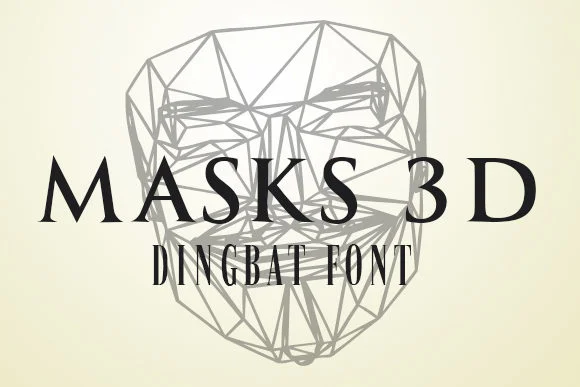
Masks 3D by vladimirnikolic is a linear dingbats collection that transforms geometric 3D mask forms into workable symbols. The entire character set maintains a consistent stroke weight throughout, creating a visual system where each glyph feels deliberate rather than merely decorative. Because they're built on dimensional geometry, the masks read clearly at any size while preserving that dimensional quality that catches your eye.
The real value lies in the specificity. You're not getting generic mask icons. These are structured forms that work beautifully in masquerade ball invitations where consistency across the suite matters. Weave them into carnival and costume graphics to add visual interest without overwhelming the layout. They're equally at home as scrapbooking elements or social media sticker designs where you want something more refined than typical clip-art. Halloween invitation suites and DIY craft printables are natural fits too, since the linear quality stays legible even when printed small or used at multiple scales.
Most dingbat sets try to be everything to everyone and end up feeling unfocused. Masks 3D takes a narrower path: mask-themed symbols that work as decorative accents and as building blocks for larger visual systems. If you're working on a project that needs these specific characters, you're in luck. Head over to Creative Fabrica to add it to your library.
Style & Use Cases
- Overall Style
- Iconographic, Mask
- Use Case
- Icons, Accents
- Ideal For
- ornaments, bullets, and decorative flourishes
- Pairs With
- any text font
How to Install Masks 3D Font
Step-by-step instructions for every platform
- 1Download the Masks 3D font file (.ttf or .otf).
- 2Locate the downloaded file in your Downloads folder.
- 3Right-click the font file.
- 4Select "Install" to install for the current user, or "Install for all users" to make it available system-wide.
- 5Masks 3D is now available in Word, Photoshop, Illustrator, and all other apps.
More by vladimirnikolic
View all →

Browse fonts by theme
Curated collections →Saw a font in a picture? Identify any font from an image with our free Font Finder.
More Dingbats Fonts
Browse all →







What pairs well with Masks 3D Font?
Masks 3D Font is a versatile dingbats font that works for both headings and body text. Pair it with a contrasting sans-serif or serif font to add visual interest and a clear distinction between titles and body copy.




Masks 3D Font
Reviewed by the FontBoxDL team · Updated July 2026