 Firefox
 1 / 8
1 / 8About Make It Merry Dingbats Font
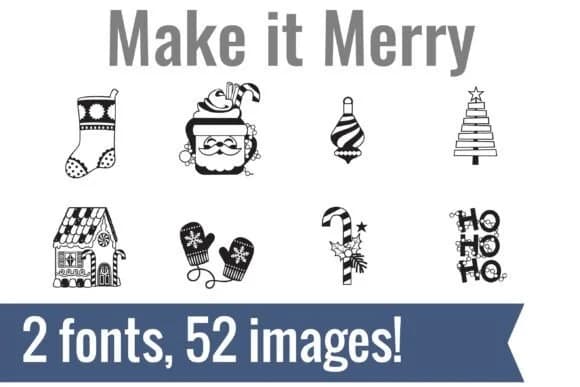
This pair of dingbat fonts from Illustration Ink gets holiday design right by stripping it down to essentials: a clean visual language of Christmas symbols that remain crisp at any scale. Make It Merry Dingbats packs 52 festive glyphs across two coordinated fonts, each rendered with enough detail to feel handcrafted without tipping into clutter. You'll find a gingerbread house, striped stocking, layered tree, hot cocoa mugs with details, and the repeating "HO HO HO" text that works as a standalone graphic or fills borders.
Since these are true vector fonts rather than static clip art, they integrate directly into your design software or cutting app. Scale them up for holiday vinyl decals or down for Christmas gift tags, personalized stocking labels, and teacher bulletin board posters without losing crispness. Crafters use them for advent calendar page designs and DIY holiday craft signs. Planners layer them into seasonal spreads. Running both fonts together keeps the visual identity clean and cohesive.
This font collection is made for crafters and designers who work by hand. Find Make It Merry Dingbats on Creative Fabrica and fill your design workflow with ready-made holiday symbols.
Style & Use Cases
- Overall Style
- Iconographic, Christmas Font
- Use Case
- Icons, Accents
- Ideal For
- ornaments, bullets, and decorative flourishes
- Pairs With
- any text font
How to Install Make It Merry Dingbats Font
Step-by-step instructions for every platform
- 1Download the Make It Merry Dingbats font file (.ttf or .otf).
- 2Locate the downloaded file in your Downloads folder.
- 3Right-click the font file.
- 4Select "Install" to install for the current user, or "Install for all users" to make it available system-wide.
- 5Make It Merry Dingbats is now available in Word, Photoshop, Illustrator, and all other apps.
More by Illustration Ink
View all →



Browse fonts by theme
Curated collections →Saw a font in a picture? Identify any font from an image with our free Font Finder.
More Dingbats Fonts
Browse all →







What pairs well with Make It Merry Dingbats Font?
Make It Merry Dingbats Font is a versatile dingbats font that works for both headings and body text. Pair it with a contrasting sans-serif or serif font to add visual interest and a clear distinction between titles and body copy.



Make It Merry Dingbats Font
Reviewed by the FontBoxDL team · Updated June 2026