 Firefox
 1 / 8
1 / 8About Lucky Kawaii Dingbats Font
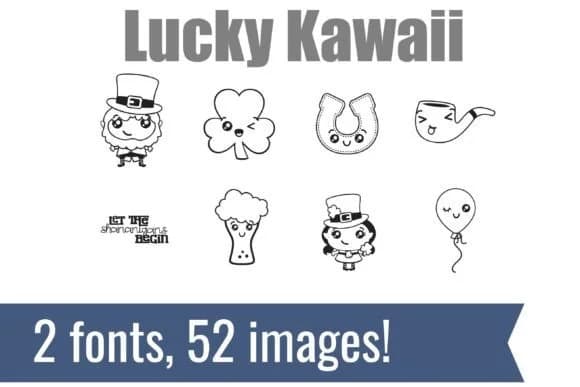
You're designing a St. Patrick's Day sticker sheet for a friend's small craft business, and you want something that feels fresh and playful rather than the standard green and gold. Lucky Kawaii Dingbats, created by Illustration Ink, brings hand-drawn Japanese kawaii style to traditional St. Patrick's themes. The font works as a collection of dingbat characters: blushing shamrocks, smiling horseshoes, cheerful leprechaun faces, and even a grinning glass of stout, each with that signature cute aesthetic that makes you smile when you see it.
This character set works beautifully for DIY vinyl sticker bundles, St. Patrick's Day greeting cards, festive apron designs, and printable classroom activity sheets. Since each character is hand-drawn rather than digitally rendered, they have slightly imperfect warmth that reads well even when scaled down. The dingbat format means you can mix and match characters to build custom layouts without needing illustration skills yourself. You get the full range of St. Patrick's imagery here, so you're not limited to just shamrocks.
With a solid range of characters in the font file, you can create layered designs by combining multiple characters at different sizes. Find Lucky Kawaii Dingbats on Creative Fabrica and add it to your seasonal collection.
Style & Use Cases
- Overall Style
- Iconographic, Dingbats
- Use Case
- Icons, Accents
- Ideal For
- ornaments, bullets, and decorative flourishes
- Pairs With
- any text font
How to Install Lucky Kawaii Dingbats Font
Step-by-step instructions for every platform
- 1Download the Lucky Kawaii Dingbats font file (.ttf or .otf).
- 2Locate the downloaded file in your Downloads folder.
- 3Right-click the font file.
- 4Select "Install" to install for the current user, or "Install for all users" to make it available system-wide.
- 5Lucky Kawaii Dingbats is now available in Word, Photoshop, Illustrator, and all other apps.
More by Illustration Ink
View all →



Browse fonts by theme
Curated collections →Saw a font in a picture? Identify any font from an image with our free Font Finder.
More Dingbats Fonts
Browse all →







What pairs well with Lucky Kawaii Dingbats Font?
Lucky Kawaii Dingbats Font is a versatile dingbats font that works for both headings and body text. Pair it with a contrasting sans-serif or serif font to add visual interest and a clear distinction between titles and body copy.



Lucky Kawaii Dingbats Font
Reviewed by the FontBoxDL team · Updated June 2026