 Firefox
 1 / 8
1 / 8About Lucky Kawaii Font
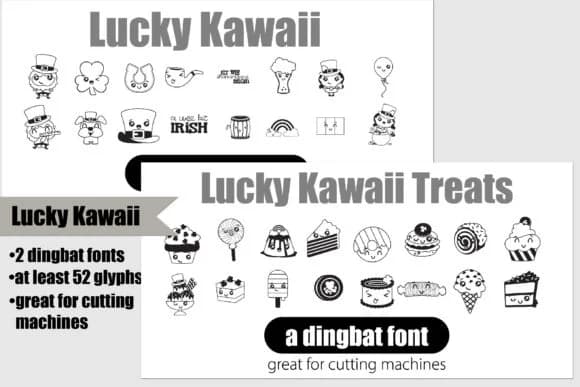
You're creating vinyl decals for a St. Patrick's Day pop-up shop and need a font that captures the holiday's playful spirit without feeling generic or overused. Lucky Kawaii by Illustration Ink delivers this balance through a thoughtful dingbat duo. The set includes two complementary fonts, each with 26 custom characters: one features whimsical leprechauns and shamrocks while the other showcases festive St. Patrick's Day dessert illustrations in a distinctly hand-drawn style.
This pair becomes invaluable for holiday vinyl stickers, custom cutting machine designs, and festive apparel graphics. Small businesses rely on it for pub merchandise labels, boutique bakery packaging with an Irish theme, and Etsy product tags that actually stand out in a crowded marketplace. Craft makers layer both fonts when designing greeting cards, home decor stickers, and DIY craft signage for holiday markets and seasonal sales. The dual-font structure gives you real flexibility: you can stack symbols with imagery or swap between character sets depending on your layout and design direction.
Both fonts are optimized for cutting machines and vinyl applications with full character sets ready to use right out of the box. Find Lucky Kawaii on Creative Fabrica and start bringing your St. Patrick's Day ideas to life.
Style & Use Cases
- Overall Style
- Iconographic, Dingbat
- Use Case
- Icons, Accents
- Ideal For
- ornaments, bullets, and decorative flourishes
- Pairs With
- any text font
How to Install Lucky Kawaii Font
Step-by-step instructions for every platform
- 1Download the Lucky Kawaii font file (.ttf or .otf).
- 2Locate the downloaded file in your Downloads folder.
- 3Right-click the font file.
- 4Select "Install" to install for the current user, or "Install for all users" to make it available system-wide.
- 5Lucky Kawaii is now available in Word, Photoshop, Illustrator, and all other apps.
More by Illustration Ink
View all →



Browse fonts by theme
Curated collections →Saw a font in a picture? Identify any font from an image with our free Font Finder.
More Dingbats Fonts
Browse all →







What pairs well with Lucky Kawaii Font?
Lucky Kawaii Font is a versatile dingbats font that works for both headings and body text. Pair it with a contrasting sans-serif or serif font to add visual interest and a clear distinction between titles and body copy.



Lucky Kawaii Font
Reviewed by the FontBoxDL team · Updated July 2026