 Firefox
 1 / 8
1 / 8About Lucky Dog Font
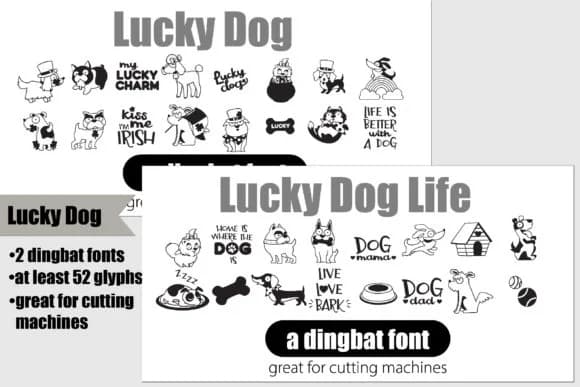
Lucky Dog by Illustration Ink is a pair of dingbat fonts brimming with Irish-themed charm and playful dog characters. Each font holds 26 hand-drawn glyphs: one celebrates lucky dog symbols and fortune-themed imagery, while its partner focuses on St. Patrick's Day aesthetics with dog-centered designs, shamrocks, and festive accents. Together they create a unified collection for anyone blending holiday fun with pet-loving themes.
These dingbats excel in vinyl decal work, especially custom wall art and personalized gifts for dog lovers on a budget. Etsy sellers use them for St. Patrick's Day craft bundles and themed shop sections, while party planners incorporate them into Irish pub-style invitations and table settings. DIY crafters appreciate the range for seasonal decorative signage, from small ornaments to larger garden markers. The dual-font setup offers flexibility: layer one font over the other for depth, or use each independently to keep designs clean and focused. Every glyph cuts precisely on standard cutting machines, so you can go from digital file to finished vinyl decal without adaptation.
Independent makers and small business owners who work across seasonal merchandise and pet-themed branding will find Lucky Dog especially valuable. Head to Creative Fabrica to grab both fonts and integrate them into your next project.
Style & Use Cases
- Overall Style
- Iconographic, Dingbat
- Use Case
- Icons, Accents
- Ideal For
- ornaments, bullets, and decorative flourishes
- Pairs With
- any text font
How to Install Lucky Dog Font
Step-by-step instructions for every platform
- 1Download the Lucky Dog font file (.ttf or .otf).
- 2Locate the downloaded file in your Downloads folder.
- 3Right-click the font file.
- 4Select "Install" to install for the current user, or "Install for all users" to make it available system-wide.
- 5Lucky Dog is now available in Word, Photoshop, Illustrator, and all other apps.
More by Illustration Ink
View all →



Browse fonts by theme
Curated collections →Saw a font in a picture? Identify any font from an image with our free Font Finder.
More Dingbats Fonts
Browse all →







What pairs well with Lucky Dog Font?
Lucky Dog Font is a versatile dingbats font that works for both headings and body text. Pair it with a contrasting sans-serif or serif font to add visual interest and a clear distinction between titles and body copy.



Lucky Dog Font
Reviewed by the FontBoxDL team · Updated July 2026