 Firefox
 1 / 5
1 / 5About Loomad Font
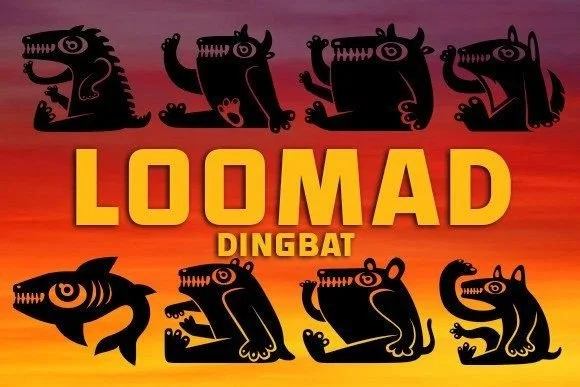
Hand-drawn cartoon creatures with distinct personalities dominate this dingbat collection, each one designed with enough character to function as a standalone design element. Loomad, created by vladimirnikolic, gathers these playful monsters into a usable font, transforming individual illustrations into accessible letterforms you can layer and repeat throughout a layout.
The value emerges in concrete applications. Halloween party invitations gain visual impact when these creatures act as border elements or spot illustrations throughout the suite. Children's storybook layouts benefit from having illustrated creatures on tap for endpapers, chapter breaks, and interior decoration. Independent comic artists layer them into panel backgrounds and title cards, building visual continuity across sequential art, while product designers working on quirky packaging or boutique labels find the distinctiveness helps their work stand apart from the template-heavy alternatives that dominate retail shelves.
Each character carries enough personality that you avoid the generic feel plaguing many symbol fonts. Event designers building themed celebration materials, small press publishers working on children's books, and indie brand owners developing distinctive visual identities all find immediate uses for creatures this expressive. The font works best for projects where personality and playfulness matter alongside function, especially those targeting audiences who value handmade character over polished perfection. You'll find Loomad on Creative Fabrica, ready to use.
Style & Use Cases
- Overall Style
- Iconographic, Creature
- Use Case
- Icons, Accents
- Ideal For
- ornaments, bullets, and decorative flourishes
- Pairs With
- any text font
How to Install Loomad Font
Step-by-step instructions for every platform
- 1Download the Loomad font file (.ttf or .otf).
- 2Locate the downloaded file in your Downloads folder.
- 3Right-click the font file.
- 4Select "Install" to install for the current user, or "Install for all users" to make it available system-wide.
- 5Loomad is now available in Word, Photoshop, Illustrator, and all other apps.
More by vladimirnikolic
View all →


Browse fonts by theme
Curated collections →Saw a font in a picture? Identify any font from an image with our free Font Finder.
More Dingbats Fonts
Browse all →







What pairs well with Loomad Font?
Loomad Font is a versatile dingbats font that works for both headings and body text. Pair it with a contrasting sans-serif or serif font to add visual interest and a clear distinction between titles and body copy.




Loomad Font
Reviewed by the FontBoxDL team · Updated July 2026