 Firefox
 1 / 10
About Lone Pine Font
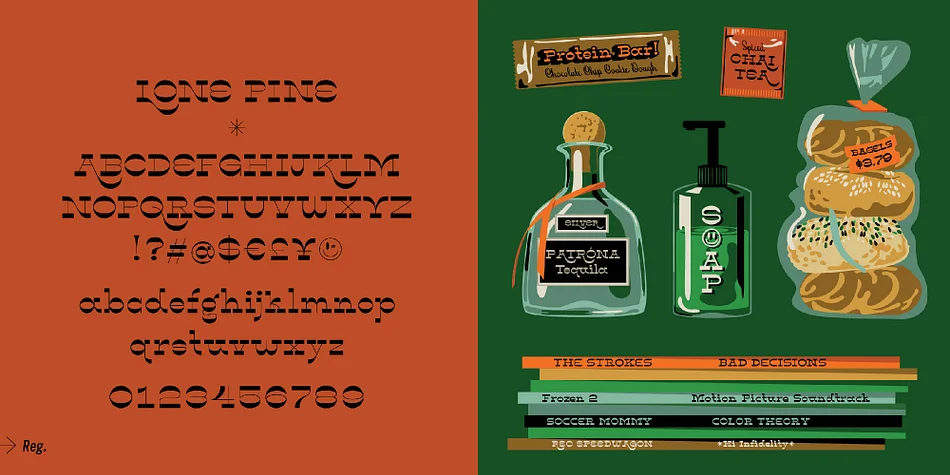
Lone Pine font by Hoodzpah is a reverse contrast serif typeface with 110% zazz and juuj. It’s inspired by Route 395 in California, which runs along the Eastern Sierra Nevadas; And by the many towns scattered along the way, namely Lone Pine, CA at the base of Mt. Whitney. This display font is super high contrast, and features big swashes for immediate wow factor. Turn on style set 01 for a more 70’s sci-fi look.
Features:
Standard Latin Characters.
Numericals & Fractions.
Mathematical, Punctuation, and Currency Symbols.
Tons of extras like Arrows and Smiley Faces.
2 style sets: (standard w/swashes) and SS.01 (w/out swashes).
2 weights: bold and regular.
Details:
487 Glyphs
Open Type Format
Supports 37 Languages (scroll for more)
Credits:
Typeface Design: Amy Hood, Hoodzphah, Inc.
Production: Hoodzpah, Inc.
© Hoodzpah, Inc. 2020
Style & Use Cases
- Overall Style
- Bold, Distinctive
- Use Case
- Headlines, Posters
- Ideal For
- logos, packaging, and standout titles
- Pairs With
- a neutral sans-serif
How to Install Lone Pine Font
Step-by-step instructions for every platform
- 1Download the Lone Pine font file (.ttf or .otf).
- 2Locate the downloaded file in your Downloads folder.
- 3Right-click the font file.
- 4Select "Install" to install for the current user, or "Install for all users" to make it available system-wide.
- 5Lone Pine is now available in Word, Photoshop, Illustrator, and all other apps.
More by Hoodzpah
View all →
Browse fonts by theme
Curated collections →Saw a font in a picture? Identify any font from an image with our free Font Finder.
More Decorative Fonts
Browse all →







What pairs well with Lone Pine Font?
Lone Pine Font is a decorative font that shines as a display or heading face. Pair it with a clean sans-serif or serif font for body text — the contrast creates a clear hierarchy while the two styles stay balanced and easy to read.




Lone Pine Font
by Hoodzpah
Reviewed by the FontBoxDL team · Updated May 2026