 Firefox
 1 / 5
1 / 5About LL Record Font
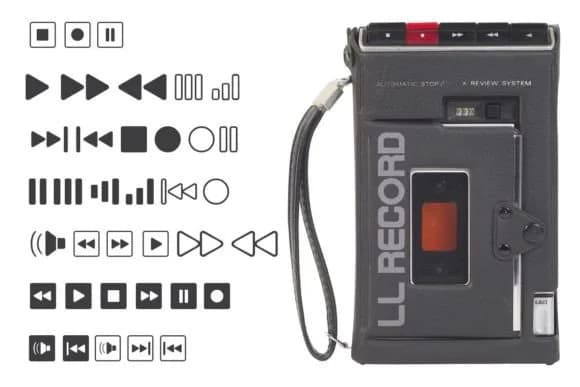
Designing retro music packaging or creating a vintage radio station logo requires period-authentic visual details that transcend generic symbol work. LL Record, created by Markus Schroppel, draws its character directly from the buttons and switches of stereo receivers, offering graphic elements that feel genuinely grounded in analog equipment design. You get clean, recognizable control icons and playback symbols rendered in a visual language that instantly signals mid-century modern without slipping into parody.
This dingbat set proves invaluable for vinyl record label designs, podcast cover layouts, analog-themed music event posters, and music merchandise packaging where visual authenticity strengthens the brand story. Musicians, collectors, and designers working on retro-focused projects find these symbols far more useful than generic alternatives because they mirror the actual visual vocabulary of vintage audio gear. Radio station branding and concert poster work also benefits from this level of specificity, giving you symbols that feel earned rather than applied.
The crisp linework maintains legibility whether you scale the icons large for physical signage or keep them compact as subtle accent marks threaded through a layout. Get this collection on Creative Fabrica and layer authentic mid-century character into any project centered on sound, recording, or retro aesthetic.
Style & Use Cases
- Overall Style
- Iconographic
- Use Case
- Icons, Accents
- Ideal For
- ornaments, bullets, and decorative flourishes
- Pairs With
- any text font
How to Install LL Record Font
Step-by-step instructions for every platform
- 1Download the LL Record font file (.ttf or .otf).
- 2Locate the downloaded file in your Downloads folder.
- 3Right-click the font file.
- 4Select "Install" to install for the current user, or "Install for all users" to make it available system-wide.
- 5LL Record is now available in Word, Photoshop, Illustrator, and all other apps.
More by Markus Schroppel
View all →


Browse fonts by theme
Curated collections →Saw a font in a picture? Identify any font from an image with our free Font Finder.
More Dingbats Fonts
Browse all →







What pairs well with LL Record Font?
LL Record Font is a versatile dingbats font that works for both headings and body text. Pair it with a contrasting sans-serif or serif font to add visual interest and a clear distinction between titles and body copy.



LL Record Font
Reviewed by the FontBoxDL team · Updated July 2026