 Firefox
 1 / 8
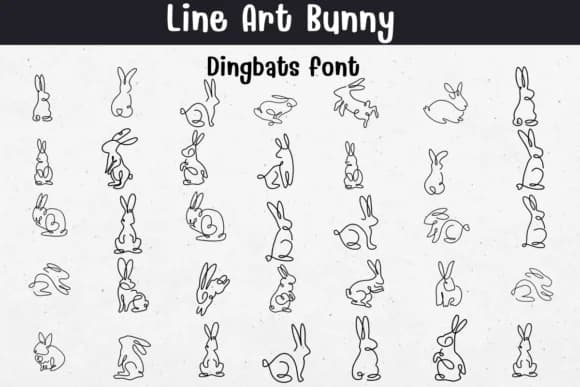
1 / 8About Line Art Bunny Font
You're sketching out a custom logo for a small pet-themed brand and realize you need some minimalist bunny illustrations that don't feel overly cute or precious. Line Art Bunny by Sontaya offers exactly what you need: clean single-line bunny designs that work as standalone graphics or decorative elements. This dingbats font translates line art into usable characters, giving you flexibility across multiple formats: OTF, TTF, Procreate, and Affinity apps all support it.
The font shines in specific projects where simplicity reads as genuine sophistication. Design custom wedding invitation dingbats using the bunny motifs as delicate accents. Create coloring page templates for nurseries or Easter marketing campaigns that feel hand-drawn and personal. Build logo mark options for indie pet product brands seeking a modern, minimal look. Layer the outline bunnies into scrapbooking layouts, gift tag designs, or DIY craft signage. Because each character is a single continuous line, the art style remains consistent whether you scale it up for a poster or shrink it down for a small icon.
What makes this particularly practical is that the line-art construction means you can stroke or fill the shapes however your project demands. Download it on Creative Fabrica and have bunny illustrations ready whenever your design calls for that clean, unfussy aesthetic.
Style & Use Cases
- Overall Style
- Iconographic, Diy
- Use Case
- Icons, Accents
- Ideal For
- ornaments, bullets, and decorative flourishes
- Pairs With
- any text font
How to Install Line Art Bunny Font
Step-by-step instructions for every platform
- 1Download the Line Art Bunny font file (.ttf or .otf).
- 2Locate the downloaded file in your Downloads folder.
- 3Right-click the font file.
- 4Select "Install" to install for the current user, or "Install for all users" to make it available system-wide.
- 5Line Art Bunny is now available in Word, Photoshop, Illustrator, and all other apps.
Browse fonts by theme
Curated collections →Saw a font in a picture? Identify any font from an image with our free Font Finder.
More Dingbats Fonts
Browse all →







What pairs well with Line Art Bunny Font?
Line Art Bunny Font is a versatile dingbats font that works for both headings and body text. Pair it with a contrasting sans-serif or serif font to add visual interest and a clear distinction between titles and body copy.



Line Art Bunny Font
by Sontaya
Reviewed by the FontBoxDL team · Updated June 2026