 Firefox
 1 / 10
About Leaves and Twigs Font
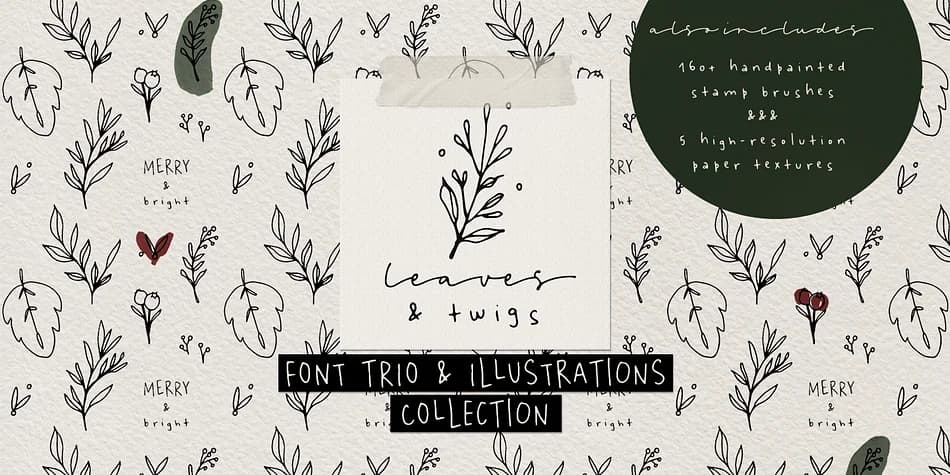
Leaves and Twigs by Ana's Fonts is an ornamental font collection that combines three coordinated typefaces with a full library of botanical illustrations. The set includes a tall, all-caps sans serif with a slant option, a compact spaced sans serif with a jumpy alternate, and a flowing spaced script font, alongside a floral dingbat font with a blackout variant. All fonts share the same consistent line width, making them natural partners for complex compositions. You'll find this collection especially useful for wedding invitation suites, indie skincare packaging design, holiday card projects, and small-business branding work where hand-drawn character is essential.
Beyond the four fonts themselves, the collection packs over 160 Photoshop stamp brushes (in both .ABR and .PNG formats), five high-resolution paper texture scans for background layers, and 24 hand-painted color blobs with transparent backgrounds. These extras let you build complete brand systems without hunting down complementary assets elsewhere. The botanical ornaments scale down at 4x relative to the typefaces, so they integrate cleanly for dense layering or subtle accents. From DIY craft labels to boutique product branding, the coherent visual language here does real work.
Get Leaves and Twigs on Creative Fabrica and start building designs that feel genuinely handmade.
Style & Use Cases
- Overall Style
- Iconographic
- Use Case
- Icons, Accents
- Ideal For
- ornaments, bullets, and decorative flourishes
- Pairs With
- any text font
How to Install Leaves and Twigs Font
Step-by-step instructions for every platform
- 1Download the Leaves and Twigs font file (.ttf or .otf).
- 2Locate the downloaded file in your Downloads folder.
- 3Right-click the font file.
- 4Select "Install" to install for the current user, or "Install for all users" to make it available system-wide.
- 5Leaves and Twigs is now available in Word, Photoshop, Illustrator, and all other apps.
More by Ana's Fonts
View all →
Browse fonts by theme
Curated collections →Saw a font in a picture? Identify any font from an image with our free Font Finder.
More Dingbats Fonts
Browse all →







What pairs well with Leaves and Twigs Font?
Leaves and Twigs Font is a versatile dingbats font that works for both headings and body text. Pair it with a contrasting sans-serif or serif font to add visual interest and a clear distinction between titles and body copy.



Leaves and Twigs Font
by Ana's Fonts
Reviewed by the FontBoxDL team · Updated August 2026