 Firefox
 1 / 8
1 / 8About Leaves Font
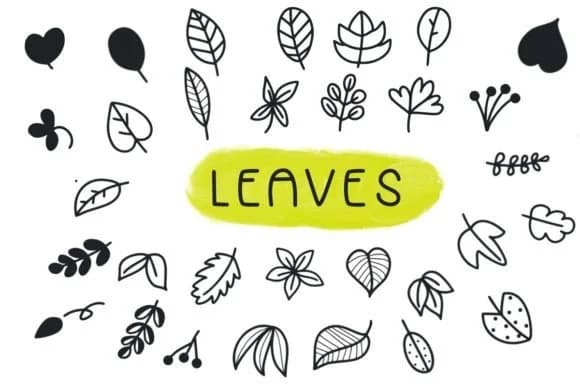
This hand-drawn dingbats collection presents a range of leafy ornamental characters, each rendered with the kind of organic, sketchy appeal you'd find in traditional botanical art. Leaves, created by Foam-Design Store, brings that illustration style to your typography toolkit in a way that feels authentic and craft-focused. Every stroke is intentionally imperfect, the kind of mark-making you'd see in a designer's sketchbook, which gives each leaf character genuine warmth and a distinctly non-corporate presence.
Dingbats like these work best when they solve a real problem in your layout. Botanical wedding invitation suites gain visual sophistication when you use these leaves as dividers or scattered corner flourishes. Scrapbooking pages come alive with leaf elements layered across card stock, especially for nature-themed layouts. Product labels for artisan goods, from herbal teas to small-batch candles to indie skincare, benefit from the naturalistic tone these characters establish. DIY gift tags and hand-bound journal spreads become more polished when you swap generic clip art for these organic marks. That intentional, sketchy quality removes the sterile feeling of default library elements and makes your work feel like it came from a designer's actual hand.
This font speaks to makers and designers building nature-centric work who want an alternative to stock imagery. You'll find Leaves on Creative Fabrica.
Style & Use Cases
- Overall Style
- Iconographic, Leaf
- Use Case
- Icons, Accents
- Ideal For
- ornaments, bullets, and decorative flourishes
- Pairs With
- any text font
How to Install Leaves Font
Step-by-step instructions for every platform
- 1Download the Leaves font file (.ttf or .otf).
- 2Locate the downloaded file in your Downloads folder.
- 3Right-click the font file.
- 4Select "Install" to install for the current user, or "Install for all users" to make it available system-wide.
- 5Leaves is now available in Word, Photoshop, Illustrator, and all other apps.
More by Foam-Design Store
View all →

Browse fonts by theme
Curated collections →Saw a font in a picture? Identify any font from an image with our free Font Finder.
More Dingbats Fonts
Browse all →







What pairs well with Leaves Font?
Leaves Font is a versatile dingbats font that works for both headings and body text. Pair it with a contrasting sans-serif or serif font to add visual interest and a clear distinction between titles and body copy.



Leaves Font
Reviewed by the FontBoxDL team · Updated July 2026