 Firefox
 1 / 3
1 / 3About Leaves Font
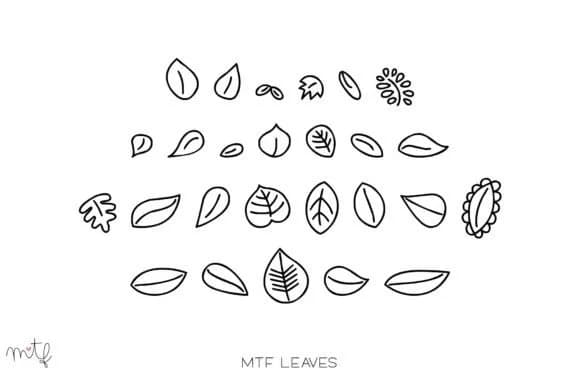
Imagine decorating a bullet journal page with ornamental touches or adding organic flourishes to a greeting card design. Leaves, created by Miss Tiina, is a dingbat font built entirely around hand-drawn leaf accents that bring botanical warmth to any text-based project. The simple, sketchy quality makes it ideal for several specific applications: botanical invitation suites, plant-themed sticker designs, DIY herbal packaging labels, and nature-inspired planner spreads where you want that authentic, hand-lettered feel without heavy ornamentation.
What you're really getting here is a collection of usable leaf ornaments that work effectively at multiple sizes. Some designers load these into the gaps between words or along page margins, while others layer them as full compositional elements. The font scales nicely from delicate, minimal designs to work that's more deliberately crafted and visibly handmade. Each leaf variant is distinctive enough that using them repeatedly stays visually interesting.
The practical strength of this dingbat set lies in its deliberate restraint. Miss Tiina didn't overload it with unnecessary extras, so every single character earns its place in the set. It pairs comfortably with serif fonts, script typefaces, or clean sans-serifs depending on your aesthetic direction and project requirements. Grab it from Creative Fabrica when you need reliable botanical accents for your next design work.
Style & Use Cases
- Overall Style
- Iconographic, Leaves
- Use Case
- Icons, Accents
- Ideal For
- ornaments, bullets, and decorative flourishes
- Pairs With
- any text font
How to Install Leaves Font
Step-by-step instructions for every platform
- 1Download the Leaves font file (.ttf or .otf).
- 2Locate the downloaded file in your Downloads folder.
- 3Right-click the font file.
- 4Select "Install" to install for the current user, or "Install for all users" to make it available system-wide.
- 5Leaves is now available in Word, Photoshop, Illustrator, and all other apps.
More by Miss Tiina
View all →
Browse fonts by theme
Curated collections →Saw a font in a picture? Identify any font from an image with our free Font Finder.
More Dingbats Fonts
Browse all →







What pairs well with Leaves Font?
Leaves Font is a versatile dingbats font that works for both headings and body text. Pair it with a contrasting sans-serif or serif font to add visual interest and a clear distinction between titles and body copy.



Leaves Font
by Miss Tiina
Reviewed by the FontBoxDL team · Updated July 2026