 Firefox
 1 / 5
1 / 5About Leaf Font
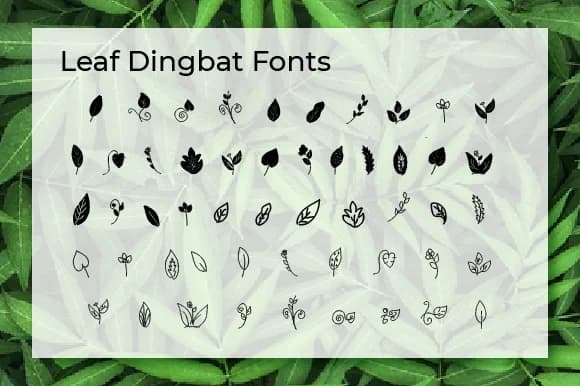
When you're laying out a garden-themed wedding invitation suite, the right ornamental elements can transform your layout from plain to polished. Leaf, designed by Ciriative, is a dingbats font packed with leaf and floral symbols that do exactly that. Rather than hunting for clip art or drawing elements by hand, you get an entire set of botanical marks at your fingertips. The symbols are detailed enough to work well at various sizes without losing their character, which matters when you're juggling different design formats.
This font shines across several real-world applications: wedding stationery with botanical accents, DIY gift tags and favor labels, eco-conscious product packaging design, and craft market signage for handmade goods. If you're designing Etsy product listings that need a nature-inspired angle, or building a scrapbook layout with botanical themes, these leaf marks layer beautifully with type. Combining different shapes and flourishes creates custom ornamental arrangements, giving your work a hand-crafted feel without the time investment of actually hand-drawing each element. The collection provides enough variety to keep designs from looking repetitive across multiple projects. Each mark's detailed craftsmanship means these elements hold up beautifully at any size.
Grab Leaf on Creative Fabrica to add these nature-inspired marks to your design toolbox.
Style & Use Cases
- Overall Style
- Iconographic, Unique
- Use Case
- Icons, Accents
- Ideal For
- ornaments, bullets, and decorative flourishes
- Pairs With
- any text font
How to Install Leaf Font
Step-by-step instructions for every platform
- 1Download the Leaf font file (.ttf or .otf).
- 2Locate the downloaded file in your Downloads folder.
- 3Right-click the font file.
- 4Select "Install" to install for the current user, or "Install for all users" to make it available system-wide.
- 5Leaf is now available in Word, Photoshop, Illustrator, and all other apps.
More by Ciriative
View all →
Browse fonts by theme
Curated collections →Saw a font in a picture? Identify any font from an image with our free Font Finder.
More Dingbats Fonts
Browse all →







What pairs well with Leaf Font?
Leaf Font is a versatile dingbats font that works for both headings and body text. Pair it with a contrasting sans-serif or serif font to add visual interest and a clear distinction between titles and body copy.



Leaf Font
by Ciriative
Reviewed by the FontBoxDL team · Updated July 2026