 Firefox
 1 / 5
1 / 5About Label Kit Font
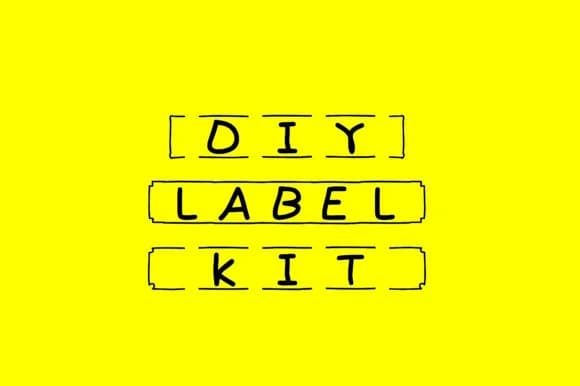
This font makes organizing feel less like a chore and more like a craft project. Created by GraphicsBam Fonts, Label Kit offers five different frame styles that transform plain text into designs that look handcrafted and intentional. Pantry label suites benefit from the varied frames, which let you create cohesive sets for glass jars and storage boxes without redoing layouts for each item. Wedding favor tags gain polish when you layer the frames with custom text. Bullet journal stickers and planner page accents work beautifully with the multiple glyphs and frame variations included, letting you swap frame styles on the fly for visual rhythm across spreads. DIY product labels and craft packaging round out the toolkit with options for making small runs feel designed rather than slapped together.
Each frame carries enough character that minimal text does maximum work, which means you spend time on the message, not the decoration. The collection's flexibility means you can use the same font across completely different projects and have each feel distinct. Combine Label Kit with a clean, warm sans-serif or classic serif for body copy, and you have a system ready for everything from event name cards to kitchen organization. The frames do the visual heavy lifting, so there's nothing fussy to manage. Find Label Kit on Creative Fabrica and get organizing.
Style & Use Cases
- Overall Style
- Iconographic, Pack
- Use Case
- Icons, Accents
- Ideal For
- ornaments, bullets, and decorative flourishes
- Pairs With
- any text font
How to Install Label Kit Font
Step-by-step instructions for every platform
- 1Download the Label Kit font file (.ttf or .otf).
- 2Locate the downloaded file in your Downloads folder.
- 3Right-click the font file.
- 4Select "Install" to install for the current user, or "Install for all users" to make it available system-wide.
- 5Label Kit is now available in Word, Photoshop, Illustrator, and all other apps.
More by GraphicsBam Fonts
View all →
Browse fonts by theme
Curated collections →Saw a font in a picture? Identify any font from an image with our free Font Finder.
More Dingbats Fonts
Browse all →







What pairs well with Label Kit Font?
Label Kit Font is a versatile dingbats font that works for both headings and body text. Pair it with a contrasting sans-serif or serif font to add visual interest and a clear distinction between titles and body copy.



Label Kit Font
Reviewed by the FontBoxDL team · Updated July 2026