 Firefox
 1 / 10
About Komyca Font
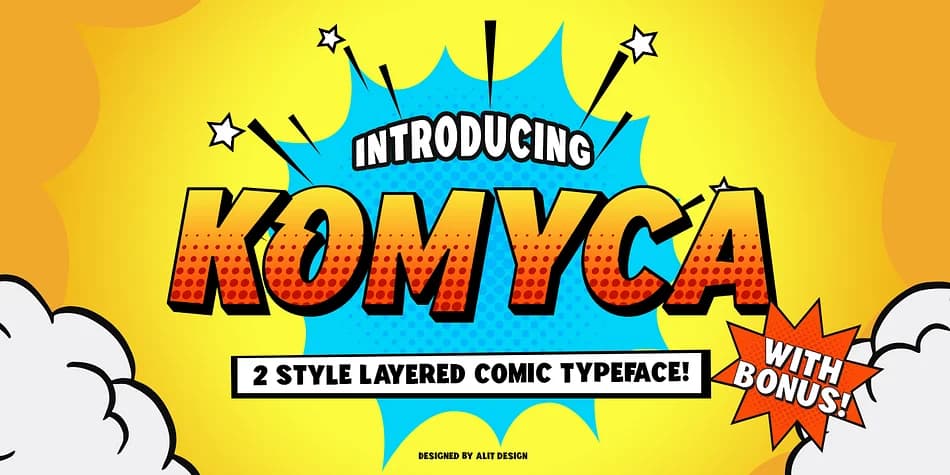
Komyca by Alit Design is a layered comic typeface that brings playful, lighthearted energy to any project. Rooted in the bold, expressive letterforms of classic comic books, this sans serif display font works wonderfully for children's book illustrations, DIY party invitations, indie game assets, and retro pop art graphics. The three-layer system (solid, dot, and shadow) gives you creative flexibility across both regular and italic styles, letting you stack and colorize each part to craft depth and visual interest that flat single-layer fonts simply can't match.
What sets Komyca apart is the bonus collection of 230 comic-themed illustrations baked right in. This means you're not just getting a typeface; you're getting visual storytelling elements that speed up the design process considerably. The full character set includes 565 glyphs plus those 230 bonus illustrations, with solid Latin, Western European, and Central European language support to keep your work accessible across regions.
Head into your design software (Adobe Creative Suite, Corel Draw, and Canva all work great) to unlock the layering magic through OpenType features, or use the included alternative font files if your program doesn't support those advanced options. Grab Komyca from Creative Fabrica and start building comics and playful graphics that actually feel alive.
Style & Use Cases
- Overall Style
- Bold, Distinctive
- Use Case
- Headlines, Posters
- Ideal For
- logos, packaging, and standout titles
- Pairs With
- a neutral sans-serif
How to Install Komyca Font
Step-by-step instructions for every platform
- 1Download the Komyca font file (.ttf or .otf).
- 2Locate the downloaded file in your Downloads folder.
- 3Right-click the font file.
- 4Select "Install" to install for the current user, or "Install for all users" to make it available system-wide.
- 5Komyca is now available in Word, Photoshop, Illustrator, and all other apps.
More by Alit Design
View all →

Browse fonts by theme
Curated collections →Saw a font in a picture? Identify any font from an image with our free Font Finder.
More Decorative Fonts
Browse all →







What pairs well with Komyca Font?
Komyca Font is a decorative font that shines as a display or heading face. Pair it with a clean sans-serif or serif font for body text — the contrast creates a clear hierarchy while the two styles stay balanced and easy to read.



Komyca Font
by Alit Design
Reviewed by the FontBoxDL team · Updated July 2026